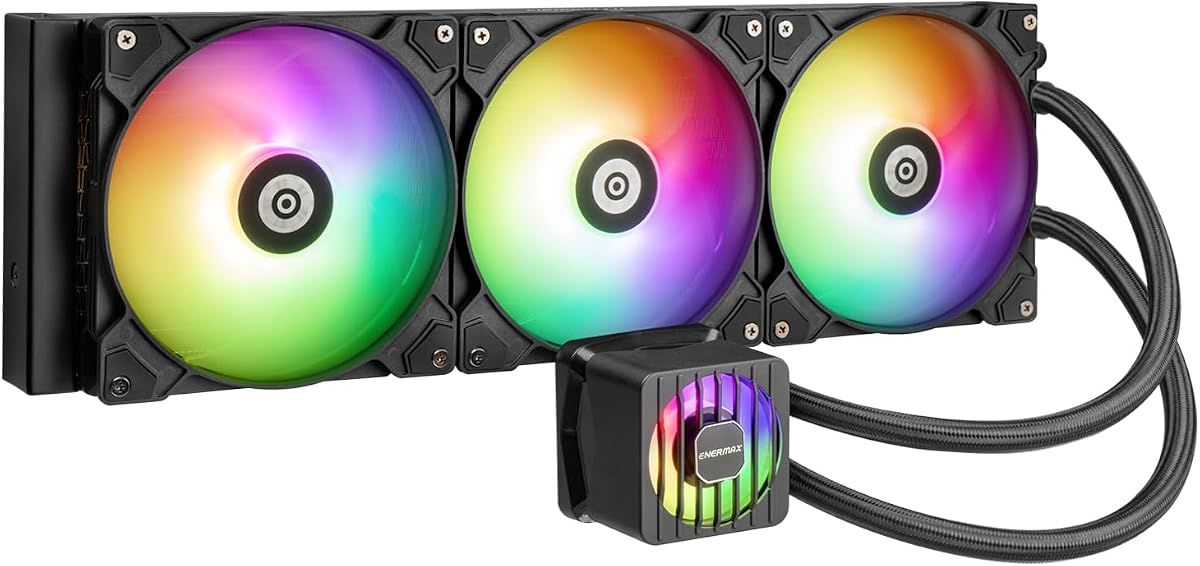
ENERMAX LIQMAXFLO 420mm A-RGB
4.1Editor score
High performance pump up to 3000RPM
Pressure optimized silent fans
Magnetic detachable pump cover
High performance computing demands robust cooling solutions to prevent thermal throttling during intense workloads. A 420mm Aio Liquid Cooler offers exceptional heat dissipation capabilities that air coolers simply cannot match for extreme processors.
We evaluated ten leading models based on cooling efficiency, noise levels, build quality, and feature sets. Our analysis considers radiator thickness, fan performance, pump reliability, and compatibility with modern CPU sockets across Intel and AMD platforms.
Each selection highlights specific strengths like budget value, premium displays, or silent operation. Prices fluctuate frequently so verify current listings before purchasing to ensure you get the best deal available for your specific system requirements today.
4.1Editor score

4.6Editor score

4.4Editor score
As an Amazon Associate we earn from qualifying purchases.
The following table provides a side-by-side comparison of all ten selected coolers highlighting their core specifications and unique selling points to help you quickly identify the model that fits your specific build constraints and performance goals.


This cooler stands out as the top recommendation for users seeking maximum thermal efficiency without breaking the bank. With a high rating from verified purchasers it delivers consistent results even under heavy overclocking conditions where other solutions often fail.
We may earn a commission when you buy through this link, at no additional cost to you.
The standout feature is the optimized contact pressure distribution which ensures longer CPU life and better heat dissipation. The P14 PRO FAN provides more power at any speed while remaining quieter than previous models especially at low speeds which is crucial for quiet workstations.
Honest trade-offs include the size of the radiator which demands a case with significant clearance. The integrated VRM fan adds value but requires specific mounting configurations that might not fit every motherboard layout perfectly.
Enthusiasts building high-end systems should buy this unit for its balance of performance and price. It is the final recommendation for anyone needing reliable cooling for LGA1851 or LGA1700 sockets without spending on premium branding.
The native offset mounting shifts the cold plate center towards the CPU hotspot ensuring more efficient heat transfer during intense processing tasks.
Integrated cable management hides PWM cables within the hose sheathing reducing visual clutter and simplifying the build process significantly.
We may earn a commission when you buy through this link, at no additional cost to you.
This variant offers the same core cooling performance as the A-RGB version at a slightly lower cost. It is an excellent choice for users who prioritize function over form and do not need extensive RGB customization for their system.
We may earn a commission when you buy through this link, at no additional cost to you.
The cooling performance relies on the P14 PRO FAN and optimized contact pressure distribution. These features ensure that heat is moved away from the CPU efficiently preventing thermal throttling even during sustained workloads like rendering or gaming.
The lack of RGB lighting might be a con for build enthusiasts but it reduces power draw and controller complexity. The integrated VRM fan still protects voltage converters ensuring the motherboard remains stable under load.
Users needing a no-fuss cooling solution should buy this model. It is the final recommendation for builders who want top-tier cooling performance without paying extra for lighting features they may not use.
Native offset mounting supports both Intel and AMD sockets allowing for efficient heat transfer across a wide range of modern processors.
By omitting RGB the unit focuses energy on the pump and fans delivering superior cooling results without additional controller overhead.
We may earn a commission when you buy through this link, at no additional cost to you.
This unit is engineered specifically for users who prioritize silence above all else. It boasts a powerful 3-chamber pump design that significantly reduces turbulences and noise making it ideal for media centers or quiet offices.
We may earn a commission when you buy through this link, at no additional cost to you.
The Silent Wings 4 fans are dampened and adjustable with a 6-pole motor to ensure virtually inaudible operation even at high speeds. The engineered cooling block provides incredibly high cooling performance while maintaining this acoustic advantage.
While the performance is outstanding the premium price reflects the high-end materials and design. The weight of the unit is also a factor to consider when mounting it on a delicate case panel or fragile structure.
Workstation users needing a quiet environment should buy this unit. It is the final recommendation for those who value a silent PC experience without sacrificing the cooling power needed for high-end workloads.
The 3-chamber pump design minimizes turbulence allowing the pump to run efficiently without generating the typical whining noises found in cheaper models.
Wide CPU plate coverage ensures heat is dissipated evenly across the processor surface which is critical for high core count CPUs.
We may earn a commission when you buy through this link, at no additional cost to you.
This specific SKU offers the same robust features as the top model with a focus on A-RGB aesthetics. It remains a top rated choice for users who want visual customization alongside serious thermal performance for their gaming rig.
We may earn a commission when you buy through this link, at no additional cost to you.
The P14 PRO FAN delivers optimal cooling performance under high load by providing more power at any speed. Integrated VRM fan lowers the temperature of voltage converters ensuring reliable performance during extended gaming sessions.
The offset mounting is a critical feature for maximizing heat transfer efficiency. However the single cable management design requires careful planning to ensure all cables route cleanly without creating airflow restrictions inside the chassis.
Gamers seeking visual flair should buy this variant. It is the final recommendation for those who want to match their system lighting while ensuring their CPU stays cool under heavy usage.
The A-RGB lighting allows the unit to sync with other system components creating a cohesive look without sacrificing cooling efficiency.
Optimized contact pressure distribution ensures longer CPU life and better heat dissipation which is essential for system stability over time.
We may earn a commission when you buy through this link, at no additional cost to you.
This cooler defines premium with its large IPS LCD display capable of showing custom images system stats and even GIFs. It is designed for users who want the absolute best aesthetics alongside top tier thermal performance for their system.
We may earn a commission when you buy through this link, at no additional cost to you.
The custom-designed NZXT Turbine pump efficiently cools even the most heat-prone CPUs with its high flow rate and head pressure. This ensures that performance is not compromised for the sake of the display features.
The display offers crisp 640 x 640 resolution and vibrant 24-bit color allowing for extensive personalization. However this high-end feature set comes at a significant cost premium that may not be justified for all users.
Showcase builders should buy this unit for its unique visual capabilities. It is the final recommendation for those who want to make a statement with their build and can afford the higher price point.
Display your favorite GIF or image and monitor real-time system performance seamlessly within the NZXT CAM software ecosystem.
The high flow rate and head pressure of the turbine pump ensure optimal cooling performance even during the most demanding thermal loads.
We may earn a commission when you buy through this link, at no additional cost to you.
This model offers a compelling alternative from a newer brand that focuses on high flow rates and modern socket support. The K6 liquid pump delivers 1.5 L/min flow rate which supports effective heat transfer for demanding CPU loads.
We may earn a commission when you buy through this link, at no additional cost to you.
The large 55.8 x 55.8mm copper base ensures efficient heat conductivity from the processor to the coolant. This combined with the Squama 2503 ARGB fans provides a balance of visual appeal and functional cooling power.
Compatibility with the latest Intel and AMD sockets including AM5 and LGA 1700 makes it a future-proof choice. However as an emerging brand software support and community guides may be less extensive than established competitors.
Early adopters looking for value should buy this unit. It is the final recommendation for users who want solid performance and modern features without paying a premium for brand recognition.
The high flow rate pump ensures coolant moves quickly through the radiator reducing thermal soak and maintaining consistent CPU temperatures.
Designed for AM5 and LGA 1700 the unit ensures your build is ready for current generation processors without adapter issues.
We may earn a commission when you buy through this link, at no additional cost to you.
Designed for professionals this cooler prioritizes reliability and silent performance over flashy lights. It uses Noctua NF-A14 industrialPPC-2000 PWM fans that deliver high airflow with minimal noise making it perfect for creative studios.
We may earn a commission when you buy through this link, at no additional cost to you.
The performance three-phase motor offers excellent cooling capability and quieter operation while the illuminated meter indicates live system load temperatures and fan speeds. This real-time monitoring helps users ensure their workstation remains stable during long renders.
The thicker radiator with larger coolant storage delivers enhanced cooling performance essential for high-core-count CPUs. However the minimalist design and price reflect its professional focus rather than consumer gaming trends.
Professionals building workstations should buy this unit. It is the final recommendation for those who need dependable cooling and precise monitoring tools for critical daily work tasks.
The illuminated meter allows users to check system load and temperatures directly on the cooler without opening software dashboards.
The minimalist design perfectly complements the aesthetics of the ProArt-family components creating a cohesive build aesthetic.
We may earn a commission when you buy through this link, at no additional cost to you.
This unit offers a compelling LCD display feature at a more accessible price point than many competitors. It features a new design with an industrial look to freshen up the 2.1-inch LCD Display which can show off videos or photos.
We may earn a commission when you buy through this link, at no additional cost to you.
The high-performance copper base plate accelerates heat conductivity while the reliable pump enables maximum water circulation. This keeps the copper plate continuously cool ensuring effective heat dissipation from the CPU during heavy usage.
Syncing with motherboard RGB software like ASUS Aura Sync or MSI Mystic Light Sync enhances the visual experience. However users must adhere to specific software requirements which can limit flexibility for some motherboard manufacturers.
Budget-conscious buyers wanting an LCD screen should buy this unit. It is the final recommendation for those who want visual customization without the premium price associated with other high-end display coolers.
With 480*480 high resolution you can easily show off 16.8M color videos or photos directly on the pump block.
The high-performance copper base plate accelerates heat conductivity ensuring quick transfer from processor to liquid coolant.
We may earn a commission when you buy through this link, at no additional cost to you.
This model is distinct for its large 3.95 square LCD display and innovative swappable fan blade design. It allows users to easily change the direction of airflow so that the LED side of the fan remains visible from all angles.
We may earn a commission when you buy through this link, at no additional cost to you.
MAGForce 2.0 improves connection reliability with magnetic daisy chain cables to make linking multiple fans together easy. The SWAFAN EX technology delivers high airflow and static pressure for effective heat dissipation on the radiator.
The unit is designed for compatibility with a wide range of Intel and AMD sockets ensuring broad utility. However lower ratings suggest potential reliability concerns compared to more established models in the market.
Custom PC enthusiasts should buy this unit for its unique features. It is the final recommendation for those who prioritize visual customization and flexible airflow options over guaranteed long-term reliability.
Included reverse blades for the SWAFANs make it easy to change airflow direction without buying a new fan model.
Magnetic daisy chain cables link fans together easily reducing cable clutter and improving installation speed.
We may earn a commission when you buy through this link, at no additional cost to you.
This unit leads the budget category with a high-performance pump capable of speeds up to 3000RPM. It delivers strong cooling performance and value without the premium features found in more expensive models making it ideal for first-time builders.
We may earn a commission when you buy through this link, at no additional cost to you.
The 38mm thick radiator provides enhanced cooling performance due to increased surface area and coolant volume. Pressure-optimized silent 140mm FDB PWM fans ensure low noise levels during operation which is beneficial for quiet setups.
Pre-applied premium thermal grease makes installation effortless while magnetic detachable pump cover can be rotated for customisation. The trade-off is a more utilitarian look compared to high-end RGB units but the cooling remains effective.
Budget focused users should buy this unit for its performance-to-price ratio. It is the final recommendation for those who want strong cooling capabilities without overspending on unnecessary aesthetic features.
High performance pump up to 3000RPM ensures aggressive heat dissipation for demanding system builds.
Pre-applied premium Dow Corning TC-5888 thermal grease simplifies setup process for immediate system deployment.
We may earn a commission when you buy through this link, at no additional cost to you.
Selecting the right 420mm Aio Liquid Cooler involves balancing cooling performance noise levels and physical fit within your case.
The 420mm radiator requires a case that can support a 140mm fan configuration typically needing a top or front mount. Verify your case clearance height and depth to ensure the pump and fans will fit without blocking RAM slots.
Always check your case manual for supported radiator sizes before purchasing to avoid compatibility issues.
Look for fans with hydraulic bearings or fluid dynamic bearing technology to ensure quieter operation. Noise levels are measured in decibels and lower values are better for quiet environments such as home offices or media rooms.
Prioritize models with PWM control to reduce fan speeds when the system is idle.
A high-performance pump increases coolant flow rate which improves heat dissipation but may also increase noise. Check the maximum RPM of the pump to ensure it aligns with your balance between cooling and silence.
Higher pump speeds generally lead to better thermal performance under sustained loads.
Ensure the cooler supports your specific CPU socket such as LGA1851 LGA1700 or AM5. Compatibility is often listed in the product description and mounting kits are usually included with the unit.
Modern coolers should support the latest socket versions without requiring additional adapters.
Some coolers include a small fan dedicated to cooling the motherboard voltage regulators. This feature helps maintain system stability during overclocking by preventing overheating of critical motherboard components.
Consider VRM cooling if you plan to overclock your CPU significantly.
Integrated cable management systems reduce visual clutter inside your case. Look for models that group PWM cables together or hide them within hose sheathing for a cleaner build.
Good cable management simplifies airflow and improves the overall aesthetics of your system.
RGB features allow you to customize the look of your cooler but require compatible software controllers. Decide if you want sync capabilities with other components or if you prefer a non-RGB option for simplicity.
Non-RGB models often cost less and use less power.
High-end models may include LCD screens for displaying system stats or custom images. These features are visually appealing but add to the cost and require software to configure content.
Evaluate if the display adds value to your specific use case before paying extra.
When installing the cooler ensure the pump is mounted in a position where air can escape easily such as the top of the case. Use the included mounting brackets and screws to secure the unit firmly without applying excessive force to the block.
Regularly check the fans to ensure they spin freely and are free from dust buildup. Cleaning the radiator fins with compressed air can help maintain optimal airflow and cooling performance over time.
Monitor your system temperatures using hardware monitoring software to verify the cooler is working correctly. If temperatures rise unexpectedly check the pump speed and fan settings to ensure the system is configured properly.
Yes they are worth it for users running high heat CPUs or overclocking. They offer superior thermal performance compared to air coolers and help prevent thermal throttling during intensive tasks like rendering or gaming.
Noise levels vary by model but high quality fans can be nearly inaudible at low speeds. Look for units with fluid dynamic bearings and PWM control to minimize noise during normal operation.
It is generally recommended to mount the radiator at the top of the case to allow air to escape upwards. Mounting on the bottom can trap heat inside the case and reduce cooling efficiency.
Yes you need a case that supports 420mm radiators. Check your case specifications for radiator height and depth clearance before purchasing to ensure a proper fit.
Modern coolers are sealed and designed to prevent leaks. However choosing a reputable brand and checking for physical damage before use can further reduce the already low risk of leakage.
Most units last between three to five years depending on usage and maintenance. Pump wear is the main factor affecting lifespan so regular monitoring of performance is recommended.
We have reviewed ten distinct models ranging from budget options to premium display units. Each offers unique benefits such as silent operation high performance pumps or integrated VRM cooling for specific user needs.
Prioritize cooling performance and case compatibility when making your final decision. Features like RGB and LCDs are secondary to ensuring your CPU stays within safe operating temperatures during heavy workloads.
Always check current prices and availability before purchasing as deals change frequently. Verify the specific compatibility of the model with your motherboard and case to ensure a smooth build experience.