
Thrustmaster T-Flight Hotas X USB Flight Sim Stick & Throttle
4.5Editor score
Affordable entry level HOTAS
Detachable throttle for flexibility
Plug and play setup
This guide compares the top ten flight controllers for Mac gaming to help pilots find the best yokes and sticks for simulation.
Flight controllers transform standard gaming into realistic aviation simulation on Mac systems. A good unit offers precise inputs, durable construction, and broad software compatibility for immersive training or leisure flights.
We evaluated ten leading products based on build quality, control precision, and Mac ecosystem integration. Our analysis covers yokes, sticks, and throttle systems designed to meet varying pilot needs and desk setups.
Each pick highlights key strengths, pros, and cons to guide your decision. Prices and availability change frequently, so check current listings before purchasing to ensure the best deal for your specific configuration.
4.5Editor score

4.6Editor score

4.4Editor score
The following table provides a side-by-side comparison of all ten flight controllers. It highlights key specifications like control type, programmable inputs, and compatibility to help you choose the right device.




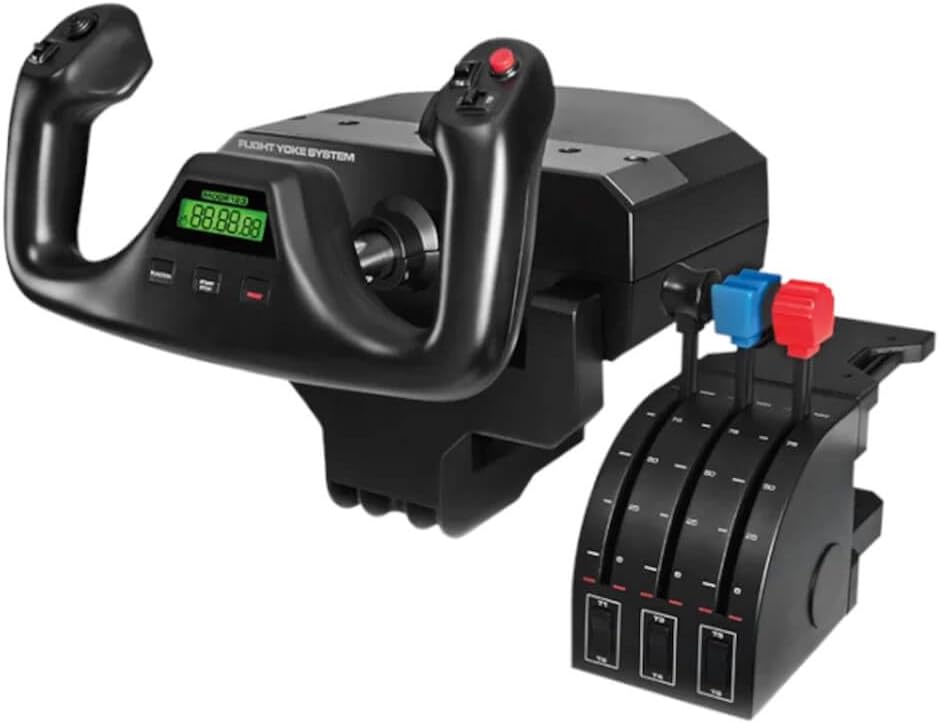

This bundle combines a realistic yoke with precise rudder pedals for a complete Mac simulation setup. It earns a top rating for delivering professional grade inputs that enhance muscle memory and flight accuracy significantly.
We may earn a commission when you buy through this link, at no additional cost to you.
The yoke features a robust design with at least 54 programmable controls covering most aircraft functions. Pedals add realistic differential toe brakes and self centering mechanics for smooth ground and air handling experiences.
Trade-offs include the need for substantial desk space and a higher investment compared to single sticks. These are acceptable for serious simmers seeking authenticity and comprehensive control over their virtual aircraft operations.
Ideal for experienced pilots or dedicated hobbyists building a home cockpit. We recommend this bundle for those prioritizing realism and complete control suites over compact or budget oriented setups.
Pedals provide critical yaw control missing from stick only setups improving takeoff and landing precision.
Adjustable foot rests and robust yoke clamps ensure comfort during long simulation sessions.
We may earn a commission when you buy through this link, at no additional cost to you.
An affordable HOTAS system perfect for beginners wanting a complete stick and throttle setup. It stands out for its ergonomic comfort and ease of use across various flight simulator titles.
We may earn a commission when you buy through this link, at no additional cost to you.
The detachable throttle offers versatility for different desk layouts. Resistance adjustments and preconfigured controls allow immediate immersion without complex software configuration or extensive setup time.
While build materials are basic and button count is limited, this fits budget constraints well. These compromises are acceptable for casual gamers or those testing the waters before investing more.
Best for new pilots or students seeking an intuitive introduction to flight sims. We recommend it for users prioritizing ease of use and value over advanced programmability or ruggedness.
Detaching the throttle allows for flexible mounting or a compact desktop arrangement depending on space.
Preconfigured controls and plug and play support mean you can start flying immediately without setup.
We may earn a commission when you buy through this link, at no additional cost to you.
A premium yoke system offering the most realistic experience for serious Mac simmers. Its construction and design reflect professional aviation standards providing unmatched smoothness and precision.
We may earn a commission when you buy through this link, at no additional cost to you.
The integrated switch panel adds critical systems controls like avionics and lights. Dual linear ball bearings and a solid steel shaft ensure minimal friction and accurate inputs for pitch and roll.
The high cost and mounting requirements are trade-offs for quality. These are acceptable for enthusiasts dedicated to authentic simulation who value engineering excellence over affordability or simplicity.
Targeted at experienced pilots and home cockpit builders. We recommend this for users who demand professional grade realism and are willing to invest in top tier hardware.
Developed by pilots and engineers this yoke delivers true to life aviation control feel.
Built in switches allow direct management of avionics and lights without complex mapping.
We may earn a commission when you buy through this link, at no additional cost to you.
This yoke system offers a professional simulation experience with a robust design suitable for building muscle memory. It provides a solid foundation for aviation enthusiasts seeking realistic pitch and roll inputs.
We may earn a commission when you buy through this link, at no additional cost to you.
The stainless steel shaft ensures smooth accurate control. With at least 54 programmable controls, pilots can map most aircraft functions directly to the yoke for streamlined operations.
Users may need to download optional software for full simulator support. Windows only notes suggest checking Mac compatibility carefully as some features may depend on specific operating system configurations.
Best for aspiring pilots looking for a realistic training tool. We recommend this for users wanting a reliable standalone yoke system with strong build quality and extensive programmability.
Designed to help experienced pilots build muscle memory with realistic yoke controls and feel.
54 programmable controls give fingertip access to most aircraft functions during flight.
We may earn a commission when you buy through this link, at no additional cost to you.
A high performance HOTAS system designed for demanding combat simulation scenarios. It delivers an extensive array of programmable controls and precise sensors for professional level flight and space sims.
We may earn a commission when you buy through this link, at no additional cost to you.
Features include 189 programmable controls and adjustable stick force springs. The RGB backlighting helps identify controls in dark cockpits enhancing visibility and immersion during night missions.
Complexity and software dependency may deter casual players. These trade-offs are acceptable for users prioritizing maximum control depth and tactical advantage in military flight simulations.
Best for combat flight enthusiasts and space sim gamers. We recommend this for users who need extensive customizability and advanced features for complex mission profiles.
Over 189 programmable inputs allow every aircraft function to be mapped instantly.
16 bit hall effect sensors ensure accurate inputs without contact wear or drift.
We may earn a commission when you buy through this link, at no additional cost to you.
A reliable system known for its LCD display and precise inputs. It offers a balanced mix of features suitable for civil and military simulation users seeking practical functionality.
We may earn a commission when you buy through this link, at no additional cost to you.
The LCD display provides essential flight data at a glance. Progressive throttle with detents for afterburner and idle gives realistic thrust control during takeoff and landing.
Build quality is solid but design is older. These are acceptable for users prioritizing function over form or seeking a proven platform with extensive community support.
Best for users wanting a practical proven HOTAS setup. We recommend this for those valuing LCD feedback and adjustable ergonomics over modern visual features.
LCD display shows critical flight info without needing to look at screens.
5 position handle adjustment ensures comfort for various hand sizes and grips.
We may earn a commission when you buy through this link, at no additional cost to you.
A versatile controller supporting multiple platforms with advanced features. It stands out for its OLED display and precision axes suitable for a wide range of flight simulation titles.
We may earn a commission when you buy through this link, at no additional cost to you.
The OLED display provides real-time flight data. Non-contact axes ensure durability and precision while RGB lighting and touchpad navigation add to immersion and ease of use.
Software features may vary or require updates. These are acceptable for users valuing cross-platform flexibility and modern tech features in a compact form factor.
Best for gamers switching between PC and console sims. We recommend this for users wanting a high-tech stick with display features in a single unit.
Works seamlessly with Xbox and PC offering flexible use across different gaming ecosystems.
Non-contact axes prevent wear and maintain accuracy over long-term use.
We may earn a commission when you buy through this link, at no additional cost to you.
A feature packed HOTAS system offering extensive programmability. It is designed for advanced users seeking maximum control depth and customization options across multiple flight simulation platforms.
We may earn a commission when you buy through this link, at no additional cost to you.
Includes 73 programmable inputs and swappable throttle detents. The VelocityOne Hangar app allows deep customization ensuring the controller fits unique pilot preferences and mission requirements.
Lower ratings suggest potential stability issues. These are acceptable for users who need advanced features and are comfortable troubleshooting software to achieve optimal performance.
Best for advanced users prioritizing programmability. We recommend this for gamers needing extensive inputs and customization but willing to manage potential setup complexities.
VelocityOne Hangar app enables personalized settings for every flight scenario.
73 programmable inputs allow detailed mapping for complex aircraft systems.
We may earn a commission when you buy through this link, at no additional cost to you.
A robust yoke system offering 75 programmable controls for comprehensive flight management. It combines precision with practical features like a USB hub to expand connection options.
We may earn a commission when you buy through this link, at no additional cost to you.
Configurable throttle knobs provide realistic input. The stainless steel shaft ensures smooth roll and pitch while the integrated USB hub simplifies connecting peripherals to the PC.
Windows notes suggest verifying Mac support for all features. These are acceptable for users prioritizing build quality and input depth over cross-platform compatibility concerns.
Best for pilots seeking a full control suite. We recommend this for users wanting a professional yoke setup with extensive programmability and robust construction.
Integrated USB hub reduces port clutter by allowing direct connection of peripherals.
Throttle knobs offer versatile control options for different aircraft systems.
We may earn a commission when you buy through this link, at no additional cost to you.
A renewed yoke system offering a cost effective entry into professional simulation. It provides classic features like a digital chronograph and Mac compatibility for budget conscious enthusiasts.
We may earn a commission when you buy through this link, at no additional cost to you.
Includes 14 buttons and POV hat for essential controls. The digital chronograph supports instrument procedures while Smart Technology software enables customizable control configuration.
Being a renewed item may affect warranty. These are acceptable for users seeking value and proven performance without paying premium prices for new units.
Best for budget conscious pilots wanting proven tech. We recommend this for users who prefer cost savings and are comfortable with renewed hardware options.
Digital chronograph helps track holds and approaches during instrument flight scenarios.
Renewed status offers significant savings while retaining core functionality and build.
We may earn a commission when you buy through this link, at no additional cost to you.
Choosing the right flight controller depends on your simulation goals and desk setup.
Yokes offer realistic pitch and roll for civil aviation while sticks suit fighter jets. Consider whether you prefer a traditional cockpit setup or a compact gaming arrangement.
Select a control type that matches your preferred flight style and available space.
Higher counts allow mapping more aircraft functions directly reducing reliance on keyboard shortcuts. This improves immersion and reaction time during complex flight scenarios.
Prioritize models with enough buttons for your specific flight simulator needs.
Stainless steel shafts and robust clamps ensure durability during long sessions. Avoid flimsy materials that may wear out under constant force and movement.
Invest in solid construction to maintain performance and longevity over years.
Check Mac OS compatibility as some units prioritize Windows. Ensure drivers support your version of macOS to avoid connectivity issues.
Verify operating system support before purchase to ensure smooth integration.
Comfortable grips and adjustable features prevent fatigue during extended flying. Proper positioning ensures precision and reduces strain on hands and wrists.
Look for adjustable handles and comfortable materials for long sessions.
Robust software enables custom mapping and profile storage. Some controllers offer cloud sync for easy setup sharing across devices.
Ensure the software is intuitive and supports your simulator requirements.
Some units allow pedals and throttle quadrants to be added later. This modularity lets you upgrade gradually without replacing your entire setup.
Consider future expansion needs when choosing a base controller unit.
Cost varies from budget sticks to premium cockpit systems. Determine your budget while ensuring the unit meets basic quality standards.
Balance affordability with features that matter most to your simulation.
Connect the controller via USB and install drivers. Calibrate sticks in system settings to ensure centering and responsiveness.
Use provided software to map buttons to your simulator. Save profiles for different aircraft types to streamline transitions between flights.
Keep units dry and dust free. Store cables properly to prevent damage during moves.
The Honeycomb Alpha Yoke offers excellent Mac support with professional grade features. Logitech renewed systems also work well on macOS with verified drivers. Check compatibility before purchasing.
Most major brands support Microsoft Flight Simulator. However, verify Mac specific support as some features may rely on Windows only software.
Yokes provide realistic civil aviation inputs while sticks suit tactical sims. Choose based on whether you prefer airliner or fighter flight experiences.
Look for at least 12 programmable buttons and adjustable resistance. This allows mapping key functions without needing a keyboard.
Quality units with steel shafts last years with proper care. Regular calibration and cleaning extend lifespan significantly.
Most controllers support external pedals but check compatibility. Some bundles include pedals for a complete setup out of the box.
The top picks offer diverse options from budget sticks to premium yokes for various pilot needs. Each delivers distinct advantages based on realism, programmability, and build quality.
Prioritize compatibility and inputs that match your preferred simulator and flight style. Ensure ergonomic comfort and expandability for long-term satisfaction.
Check current prices and availability before purchasing. Prices change regularly and bundles may offer better value than standalone units.