
RREAKA TV Dock for Nintendo Switch 2
4.4Editor score
Lightweight aluminum alloy build
100W PD charging support
Multi-device USB compatibility
This guide compares the top 10 Dock for Nintendo Switch Portable Play options for 2026, highlighting features like 4K output, PD charging, and portability to
Finding the right Dock for Nintendo Switch Portable Play can transform your gaming experience significantly. A quality dock allows you to seamlessly switch between handheld and TV modes while ensuring your console stays charged and protected during extended sessions.
We evaluated ten top-rated options based on compatibility, video output quality, charging speed, and overall portability. Each product was reviewed for its ability to support Switch models and deliver reliable performance for travelers and home gamers alike.
Each pick shows key specifications and real-world usability notes to help you decide. Please note that prices and availability change frequently, so verify current details on the product page before making your final purchase decision today.
4.4Editor score

4.2Editor score

4.4Editor score
The following table provides a side-by-side comparison of all ten selected docks. It highlights critical specifications such as video resolution, charging wattage, and port variety so you can quickly identify the best fit for your setup.
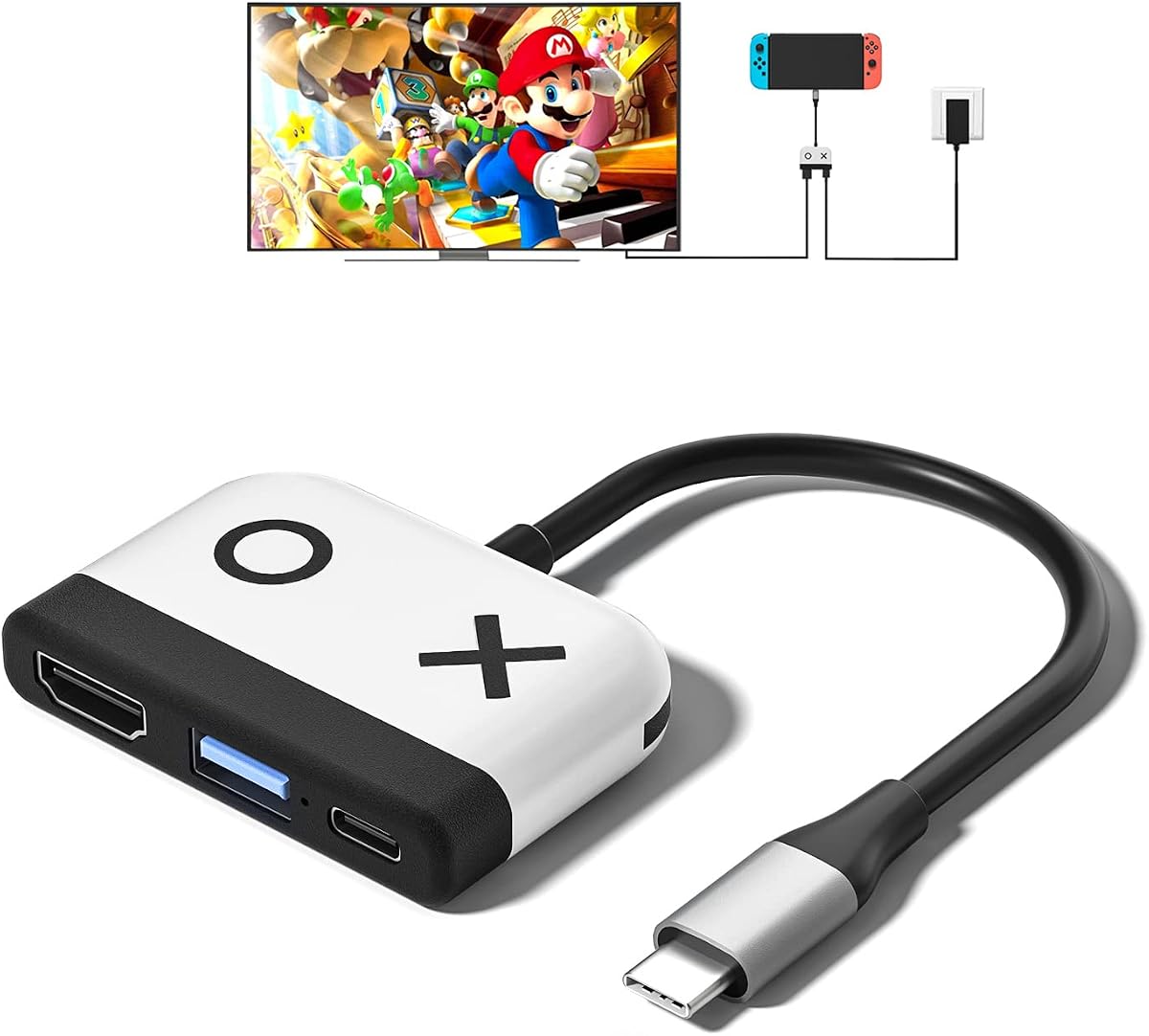


The pdobq Switch Dock is a top contender for gamers seeking a reliable portable solution. It supports multiple Nintendo Switch models including the OLED and the newer Switch 2. Users rate this unit highly for its compact design and robust port selection.
We may earn a commission when you buy through this link, at no additional cost to you.
This docking station features an HDMI 2.0 port capable of 4K at 60Hz. While the Switch itself outputs 1080p, this ensures future-proofing for other USB-C devices. The included USB 3.0 port allows for fast data transfer and peripheral connectivity.
However, users should note that the Switch Lite is not supported since it lacks TV mode capabilities. Additionally, cables are sold separately which adds to the total cost. These trade-offs are acceptable given the portability and performance.
If you frequently travel or need a spare dock at home, this is an excellent choice. It balances price and functionality well. We recommend checking that your charger meets the required power specs before use.
The HDMI 2.0 port ensures compatibility with next-generation devices beyond the current Switch. This makes it a versatile hub for tablets and laptops too.
Designed to fit easily into backpacks or bags, this dock minimizes bulk without sacrificing connectivity options. It is ideal for travelers.
We may earn a commission when you buy through this link, at no additional cost to you.
The RREAKA TV Dock offers impressive features for its budget price. It supports 4K output and includes a powerful 100W PD port. This is great for charging fast while you play on a big screen without worrying about power depletion.
We may earn a commission when you buy through this link, at no additional cost to you.
Its aluminum alloy construction keeps it lightweight yet durable. The dock supports a wide range of devices including MacBooks and iPads. This versatility makes it a smart buy for households with multiple tech gadgets.
The main drawback is that no HDMI cable or charger is included in the box. You will need to source these separately. Also, it relies on passive cooling which may warm up during long sessions.
For gamers on a tight budget, this is a strong recommendation. It delivers core functionality without unnecessary extras. Just ensure you have the right cables ready for setup.
The 100W PD port ensures you can charge even high-end laptops while using the dock. This dual utility increases value for non-gaming users.
With both USB 3.0 and 2.0 ports you can connect various peripherals simultaneously. This expands the dock beyond just video output.
We may earn a commission when you buy through this link, at no additional cost to you.
This Travel Portable Switch 2 Dock stands out because it explicitly supports the newer Switch 2 console. It includes an HDMI cable which adds immediate convenience. Users appreciate the plug-and-play setup for modern gaming setups.
We may earn a commission when you buy through this link, at no additional cost to you.
The dock delivers 4K at 60Hz and supports 100W fast charging. This ensures your console remains powered during intensive gaming sessions. It is built to handle the demands of the next-gen hardware efficiently.
The main limitation is the lack of a USB data port for connecting extra controllers or drives. This might matter to power users who need extra peripherals. However, for pure TV mode it is excellent.
If you own a Switch 2 or plan to upgrade, this is the best premium option. It ensures compatibility and includes necessary cables. We highly recommend it for early adopters of new hardware.
Built specifically with Switch 2 in mind this dock future proofs your setup. It handles the higher power and resolution needs of the new console.
Including an HDMI cable in the package saves you from buying one separately. This makes setup faster and more user-friendly out of the box.
We may earn a commission when you buy through this link, at no additional cost to you.
The Kstkry Switch Dock is encased in high-quality wear-resistant silicone. This design choice protects your console from scratches and minor impacts. It is an excellent choice for parents or travelers concerned about device safety.
We may earn a commission when you buy through this link, at no additional cost to you.
It supports standard HDMI video output and includes a USB 3.0 port for data transfer. The compact size fits easily into pockets. It is designed for convenience and ease of carrying in daily bags.
However, the silicone shell can retain heat slightly more than metal. You should ensure good airflow when used indoors. Also, it does not support the newer Switch 2 models explicitly.
For home use or light travel, this is a very practical option. The protection aspect is a major selling point. We recommend it for those prioritizing device safety over raw performance specs.
The silicone exterior provides a cushion against bumps and drops. This reduces the risk of cosmetic damage to your console during transport.
Its small dimensions allow it to slip into a jacket pocket or small pouch. This makes it arguably the most portable option on the market.
We may earn a commission when you buy through this link, at no additional cost to you.
This iPLYGAM dock offers a unique six-in-one port layout. It includes multiple USB ports and a dedicated button to switch modes. Users appreciate the detailed safety features like overheat protection.
We may earn a commission when you buy through this link, at no additional cost to you.
The LED light helps confirm status at a glance. The built-in chip protects against short circuits. This gives peace of mind during long gaming sessions where thermal management is critical.
It is slightly heavier than some ultra-light options due to the extra components. Also, the lack of included cables means you must own them beforehand. These factors may limit some users.
If you need extensive connectivity options, this is a solid pick. The safety features are robust. We recommend it for home setups where weight is not a primary concern.
The overheat and overcharge protection ensures your console stays safe during extended use. This prevents battery swelling and thermal damage.
The LED light provides a visual confirmation that power and video are active. This simplifies setup troubleshooting for less tech-savvy users.
We may earn a commission when you buy through this link, at no additional cost to you.
The Universal Switch Dock is designed for multi-platform gaming. It works with Switch Steam Deck and ROG Ally. This makes it ideal for gamers who play multiple handheld systems.
We may earn a commission when you buy through this link, at no additional cost to you.
It features 100W PD input and 4K HDMI output. The build is sleek and portable. You can mirror your screen to any TV or monitor instantly.
However, you must supply your own power and video cables. It is a barebones unit. This keeps the price low but requires preparation before use.
For gamers with diverse handheld collections, this is the best choice. It reduces the need for multiple docks. We recommend it for versatile setups.
Supporting Steam Deck and ROG Ally means you need only one dock. This saves money and reduces clutter in your travel bag.
No drivers are needed. Just connect the USB-C and HDMI to start using the TV immediately. It is very simple for any user.
We may earn a commission when you buy through this link, at no additional cost to you.
The BIYTC Switch Dock offers basic functionality at a low price. It supports both Switch 1 and 2. It is made of lightweight aluminum which aids in portability.
We may earn a commission when you buy through this link, at no additional cost to you.
It includes HDMI and USB ports for standard needs. The compact size fits into bags easily. It is designed for users who prioritize simplicity.
The feature set is minimal compared to more expensive docks. It lacks extra data ports or cooling systems. But for basic TV output it works well.
If you need a spare travel dock, this is a great value. It does the job without breaking the bank. We recommend it for budget travelers.
Supporting both Switch 1 and 2 makes it a versatile purchase regardless of your console generation. You do not need to switch docks if you upgrade.
With just the essential ports the dock remains simple and lightweight. This reduces complexity for users who just want video output.
We may earn a commission when you buy through this link, at no additional cost to you.
This AHGEIIY dock is exceptionally light at just 1.4 ounces. It supports Switch 2 and Steam Deck. The small size makes it nearly invisible in a laptop bag.
We may earn a commission when you buy through this link, at no additional cost to you.
It offers 4K HDMI and 100W PD charging. It also supports Samsung Dex mode for Android devices. This makes it a great hub for productivity and gaming.
The small footprint might make it feel flimsy to some users. It is best used on stable surfaces. Also you must supply all necessary cables.
If weight is your top priority, this is the best option. It is perfect for business travelers. We recommend it for those who need a tiny footprint.
The ability to use Samsung Dex mode adds utility for Android users. This turns your phone into a mini PC setup for work.
At 1.4 ounces this dock is one of the lightest on the market. It adds almost zero weight to your gear load.
We may earn a commission when you buy through this link, at no additional cost to you.
The Switch 2 Dock HDMI delivers a balanced mix of performance and weight. It supports 4K 60Hz output and 100W charging. It fits easily into bags and is ready for travel.
We may earn a commission when you buy through this link, at no additional cost to you.
The aluminum build feels durable. It includes a USB 3.0 port for fast data transfer. This makes it suitable for peripherals and file transfers.
However, the lack of included cables and cooling means you need to plan accordingly. It relies on passive heat dissipation. This is acceptable for most casual gaming.
For users seeking a middle ground between features and portability, this is a great choice. It is reliable and solid. We recommend it for general purpose use.
The USB 3.0 port allows for fast file transfers to external drives. This is useful for saving game data or media quickly.
The aluminum construction provides a premium feel and durability. It helps with heat dissipation to keep the dock cool.
We may earn a commission when you buy through this link, at no additional cost to you.
This dock features a unique design with ventilation openings to cool your console. It uses a spring USB connector to reduce stress on the charging port. This is thoughtful for long term port health.
We may earn a commission when you buy through this link, at no additional cost to you.
It supports 4K HDMI output and allows charging while playing. The design allows the Switch to sit on top which simplifies removal. It is convenient for casual use.
However, it has a lower rating score than others. Some users report setup issues. The design is more complex which may lead to reliability concerns.
If cooling is your main concern, this is a unique option. But weigh the rating carefully. We recommend it for those who need active thermal protection.
The flexible spring stand reduces pressure on the console port. This helps prevent damage from frequent plugging and unplugging during travel.
Multiple holes allow air to flow freely to dissipate heat. This helps keep your console cooler during long gaming sessions on TV.
We may earn a commission when you buy through this link, at no additional cost to you.
Choosing the right dock involves evaluating compatibility, port selection, and build quality. This guide breaks down the key factors to consider before making a purchase.
Ensure the dock supports your specific Switch model. Some docks only support standard Switch or OLED models and not the Lite. Always check the product description for model-specific notes.
Verify that the dock supports your specific Switch model.
Look for HDMI 2.0 ports that support up to 4K at 60Hz. This ensures future proofing even if your console only outputs 1080p. This is useful for other devices.
Look for HDMI 2.0 ports that support up to 4K at 60Hz.
PD charging is essential for playing while connected to a TV. Aim for docks that support at least 60W to 100W input to ensure stable power delivery during sessions.
Choose docks that support at least 60W input.
USB 3.0 ports offer faster data transfer speeds than 2.0. If you need to connect controllers or drives, verify the number and type of available USB ports.
Check the number of USB 3.0 ports available.
Aluminum or silicone bodies provide different benefits. Aluminum dissipates heat better while silicone offers better shock absorption. Choose based on your priority.
Aluminum dissipates heat better while silicone offers shock absorption.
For travel, weight and dimensions matter. Look for docks that fit into small bags or pockets. Avoid bulkier designs if you plan to move frequently.
Look for docks that fit into small bags or pockets.
Some docks come with HDMI cables or charging adapters. Check if these are included to save extra costs. Budget docks often sell these separately.
Check if HDMI cables or charging adapters are included.
Warranty and support are important for electronics. Check if the brand offers replacement or refunds for defective units. Reading recent reviews helps gauge reliability.
Check if the brand offers replacement or refunds for defective units.
Connect the HDMI cable to the dock and your TV first before attaching the console. Then plug in the official power adapter into the dock. Ensure the connection is snug.
Place the Switch in the dock carefully. If using a spring connector dock, align the port properly. Press the button if needed to enter TV mode. Wait for the screen to activate.
To care for the dock, keep it clean from dust. Avoid overloading the USB ports with too much power draw. Store it in a protective pouch to prevent scratches during transit.
Most docks listed support the Switch OLED model as it shares the same connector and output specifications. However, always verify the product description as some older models may be limited.
It is recommended to use official adapters to avoid damage. Docks require specific wattage like 60W to activate TV mode. Low wattage chargers may not trigger TV output.
The Switch Lite lacks video output hardware so it cannot connect to any dock. All these docks are incompatible with Switch Lite. Check your model before purchasing.
Most docks do not include HDMI cables. You will need to purchase one that supports 2.0 for 4K. Ensure the length matches your TV setup distance.
Yes docks with USB 3.0 ports support data transfer. You can connect external storage or peripherals. This makes the dock versatile for more than just gaming.
Many modern docks support USB-C devices like Steam Deck or ROG Ally. Check the product details for cross compatibility. This adds value if you own multiple consoles.
In TV mode the handheld screen turns off to save power. This is normal behavior. Ensure your TV input is set to the correct HDMI port.
Yes modern docks include safety chips to prevent overheating or overcharging. Just use a charger that meets the recommended wattage. This protects your device during long sessions.
We reviewed ten top options for portable Switch docking in 2026. Our top picks include the pdobq Switch Dock for balance and the RREAKA TV Dock for budget value. Each offers unique features tailored to different needs.
Prioritize compatibility and charging power when choosing. A dock with 4K HDMI and 100W PD ensures long term utility. Consider how often you travel to decide on weight versus features.
Prices and availability change frequently. Please check the current listings before purchasing. Verify cable needs and warranty details to ensure satisfaction with your new dock.