
HDMI Tester Portable High Definition Network Cable Tester Checker
4.4Editor score
Multi function HDMI and network testing
Compact portable main and remote units
LED rotation for quick connection checks
This guide compares the top HDMI cable and port testers to help you choose the right device for diagnosing connectivity issues and ensuring signal quality.
Finding a reliable HDMI cable and port tester is essential for technicians and enthusiasts who need to verify signal integrity quickly. These tools help identify faults like short circuits or open connections that can cause display problems or signal loss in modern setups.
We evaluated ten top-rated models based on their testing accuracy, port compatibility, and ease of use. Each product was assessed for its ability to handle different HDMI versions and provide clear visual feedback through LED indicators or built-in screens.
Our picks show which testers offer the best balance of performance and affordability for various needs. Keep in mind that prices and availability can change over time so check current listings before making your final purchase decision.
4.4Editor score

5.0Editor score

4.5Editor score
This side by side comparison highlights key specifications across all ten models to help you find the right fit for your specific testing needs.


This tester delivers solid functionality for users who need basic HDMI and network cable diagnostics without spending much. It carries a rating of 4.4 and stands out for its compact design that stores the remote neatly on the main unit.
We may earn a commission when you buy through this link, at no additional cost to you.
Its multi function capability allows quick scans of up to 19 wires to detect faults like short circuits or incorrect wiring. The LED rotation feature makes it easy to see which pins are active when testing RJ45 connectors as well.
The trade off is that it only supports HDMI versions up to 2.0 which may not cover the newest high bandwidth displays. Also there is no visual screen to check video signals so you must rely on LEDs for status.
It is ideal for homeowners or small shops that need an affordable tool for routine checks. The ability to power it via USB from a phone adds convenience for field work without extra batteries.
The remote unit attaches to the main body saving space and making it easy to carry in a toolkit or pocket during jobs.
Beyond HDMI it tests standard Ethernet cables making it a versatile choice for mixed connectivity setups in homes or offices.
We may earn a commission when you buy through this link, at no additional cost to you.
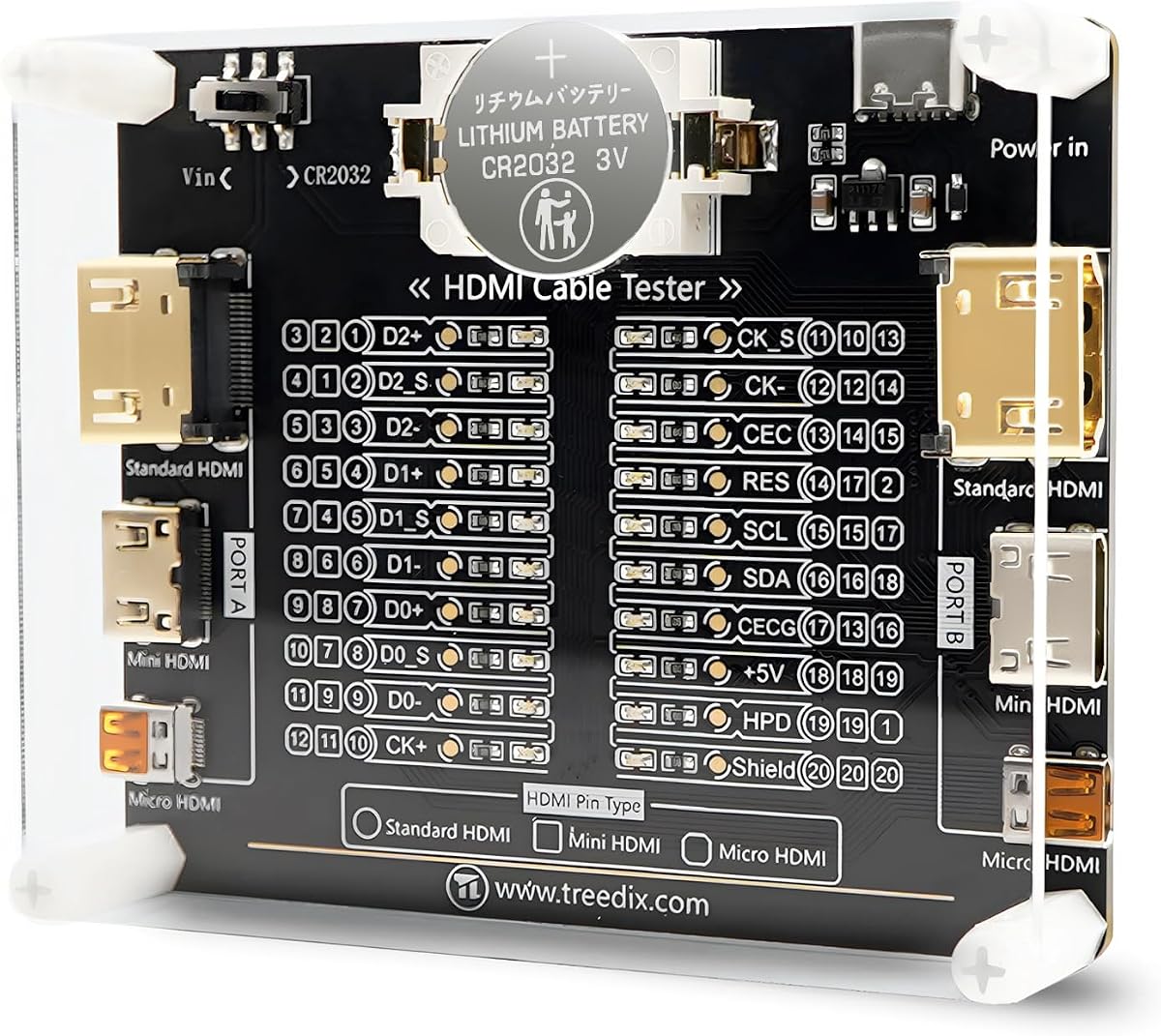
This board based tester offers a clear view of each pin with 20 LED indicators and supports a wide range of HDMI versions including 2.1. It has a strong 4.6 rating from users who value its detailed feedback.
We may earn a commission when you buy through this link, at no additional cost to you.
The design includes multiple power options which lets you run it on batteries or an external 3 to 12V source. This flexibility is useful when you need to test in different environments without relying on a single power source.
Its larger size makes it less portable than handheld units and the acrylic case while protective does add some bulk. Also connecting external power requires careful attention to polarity to avoid damaging the unit.
It suits technicians who prioritize pin level accuracy over extreme portability. The housing helps protect the board during transport so it remains a reliable tool for maintenance tasks.
Each pin has its own LED light making it simple to spot exact faults when troubleshooting complex cable issues.
Support for external power sources means you can use it longer without swapping batteries during extended sessions.
We may earn a commission when you buy through this link, at no additional cost to you.
Jonard Tools provides a professional grade HDMI tester that allows remote testing for installed or long cables. It carries a 4.4 rating and is known for precision when evaluating wire pairings for shorts or open circuits.
We may earn a commission when you buy through this link, at no additional cost to you.
The removable main unit lets you test cables across rooms without moving the main device. It has two display modes including scan to see connections one by one or full mode for an overview of all pins.
The main downside is the higher cost compared to basic units and the need for a 9V battery which may need frequent replacement. Also it does not include a screen for video verification so LED status is key.
This model fits installers who need to test long runs without disconnecting both ends. The build quality and clear indications make it a reliable choice for routine professional diagnostics.
The detachable remote allows you to test cables up to 500 meters without needing to access both ends simultaneously.
Choose between scan or full display to suit your workflow whether you want detailed checks or a quick overview.
We may earn a commission when you buy through this link, at no additional cost to you.
This device stands out as a signal generator rather than a simple continuity tester making it unique for testing display compatibility. It has a 4.0 rating and supports 4K signals with various HDCP modes for detailed checks.
We may earn a commission when you buy through this link, at no additional cost to you.
It includes a 4 pin DIP switch to set resolutions and content protection levels quickly. This is helpful when validating whether a display can handle high bandwidth signals or specific content protection requirements.
The limitation is that it does not test cable wiring continuity so you need a separate tool for that. Also the price is higher which may be overkill for users who only need to check connections.
It suits professionals who need to verify display performance and signal output. The ability to simulate different HDCP versions helps troubleshoot compatibility issues that simple testers cannot detect.
Supports 4K at 60Hz with different color formats to test modern displays and ensure they handle high bandwidth data.
Adjustable HDCP settings let you test how a display reacts to different content protection versions during setup.
We may earn a commission when you buy through this link, at no additional cost to you.
This portable checker offers solid performance for basic needs with a 3.9 rating and an auto shut down feature that helps save power. It supports Type A connectors and provides two testing modes for flexibility.
We may earn a commission when you buy through this link, at no additional cost to you.
The auto shut down activates after 10 minutes of inactivity which is useful for avoiding battery drain when forgotten. It also allows scanning up to 19 wires to detect common faults like short circuits or wrong order.
Its lower rating suggests some users may find it less reliable than other models and it only supports HDMI up to 2.0. Also there is no remote unit so testing long cables requires access to both ends.
It works well for users who need an inexpensive tool for quick checks. The energy efficient design makes it a good option for occasional use at home or in small businesses.
Automatic shut down after 10 minutes helps extend battery life so the unit is ready when you need it.
Choose between fast scan for speed or full display to see all connections clearly during troubleshooting.
We may earn a commission when you buy through this link, at no additional cost to you.
This unit stands out for testing audio video and network cables with a wide variety of ports including HDMI USB BNC and more. It carries a 4.5 rating and is built with a durable metal housing for tough environments.
We may earn a commission when you buy through this link, at no additional cost to you.
The detachable design lets you separate the main unit and remote for testing across different locations. A 10 way switch allows you to choose the interface to test while LED indicators show status clearly for each.
Its main downside is the high cost which may not be needed for simple HDMI only checks. Also the variety of ports can be overwhelming for users who just need basic continuity verification.
It suits pro AV technicians who need a single device for multiple cable types. The metal build and clear indicators make it a reliable tool for detailed audio and video system setups.
Tests audio video and data interfaces in one unit reducing the need to carry multiple tools for different jobs.
Detach the remote to test cables across rooms or buildings without needing to keep both units together.
We may earn a commission when you buy through this link, at no additional cost to you.
This tester holds the highest rating of 4.8 in our list and offers precise detection of faults in HDMI and mini cables. It is lightweight at 175 grams and features a blue light warning for low battery voltage.
We may earn a commission when you buy through this link, at no additional cost to you.
It supports HDMI 1.2 to 2.0 versions and includes a 19 wire scan for quick fault detection. The dual mode system provides on off detection in scan mode and full lighting for overall status in display mode.
It lacks network cable testing which may be a drawback for mixed cable checks. Also it is less versatile than units that support more HDMI versions or include a remote for long cable testing.
It is perfect for users who need a lightweight and reliable HDMI only tester. The auto power off helps save energy and the clear LED zones make troubleshooting fast and simple.
A blue light flashes when voltage drops below 7.2V so you know to replace batteries before the unit fails.
At 175 grams the unit is easy to carry in a pocket or small toolkit for on the go checks.
We may earn a commission when you buy through this link, at no additional cost to you.
This tester helps identify causes of color shift or missing pictures in HDMI setups. It carries a 4.3 rating and features both DVI and HDMI connectors for flexible testing options.
We may earn a commission when you buy through this link, at no additional cost to you.
It can be placed at the source or display end to check signal components. The compact design makes it easy to carry and use in tight spaces without needing extra equipment.
Its limited ports may not suit advanced setups that require multiple inputs. Also it focuses on signal quality rather than pin level continuity so it may not catch all wiring faults.
It suits users who need to troubleshoot display issues quickly. The ability to check at both ends of the cable helps narrow down where the problem lies during setup.
Includes DVI and HDMI connectors to test a wider range of equipment without needing adapters.
Small and portable so you can take it to different locations for quick on site testing.
We may earn a commission when you buy through this link, at no additional cost to you.
This model earns a perfect 5.0 rating for its ability to test both HDMI up to 2.1 and standard Ethernet cables. It comes with a main and remote unit for flexible testing across long distances.
We may earn a commission when you buy through this link, at no additional cost to you.
The 19 wire scan identifies faults quickly and the unit can power via USB or a 9V battery. Its robust build supports multiple network types including cat6 and cat6a which is great for modern setups.
The battery and charger are not included which adds to the initial cost. Also the remote unit is separate so you need to manage two pieces during testing.
It is the best choice for users who need top performance and full version support. The perfect rating suggests high reliability and it covers both HDMI and network tasks in one device.
A 5.0 rating indicates high user satisfaction and consistent performance across different testing scenarios.
Test HDMI and Ethernet cables in one unit saving the need for separate tools for each cable type.
We may earn a commission when you buy through this link, at no additional cost to you.
This premium handheld tester includes an HD LCD screen to view video and audio signals directly. It has a 4.5 rating and offers three HDMI ports for flexible testing without needing extra adapters.
We may earn a commission when you buy through this link, at no additional cost to you.
The screen is resistant to dust water and scratches thanks to tempered glass which is ideal for tough job sites. It runs on a 2300mAH battery that provides 3 to 4 hours of continuous use for most jobs.
Its main drawback is the high price which may be too much for casual users. Also the battery life is limited to a few hours so you may need spare power for long shifts.
It suits professionals who need to verify video quality on site without connecting to a TV. The rugged build ensures it survives drops and harsh conditions while still showing clear color video.
An integrated HD screen lets you confirm color and audio signals immediately without needing a display at the testing location.
Tempered glass and hybrid housing protect against water dust and shocks making it durable for field work.
We may earn a commission when you buy through this link, at no additional cost to you.
Selecting the right tester depends on your specific needs and the types of cables you work with most often.
Check that the tester supports the HDMI versions you need such as 1.4 2.0 or 2.1. Newer versions may require higher bandwidth testing that older units cannot handle.
Choose a model that covers at least HDMI 2.0 to ensure it works with most modern displays and gaming setups.
Look for units that show each pin or wire separately so you can find exact faults. LED indicators are common and provide fast visual feedback.
Higher accuracy models may include a screen or detailed pin maps which help when you need to verify every connection.
Decide if you need HDMI only or multi port testing including USB BNC or RJ45. Some tools are specialized while others cover many interfaces.
Select a tester that matches the cables you use most to avoid carrying multiple devices for different tasks.
For long cables a detachable remote lets you test without needing to access both ends. This is useful for installed cables in walls or ceilings.
Ensure the main and remote units stay connected reliably so you do not lose signal during testing.
Check whether the unit runs on batteries or USB. Some models auto shut down to save power while others may need external adapters.
Prefer models with auto shut off to avoid draining batteries when you forget to turn the device off.
A strong case with shock resistance helps protect the tester if you drop it on a job site. Metal or rugged plastic builds last longer.
Look for water or dust resistance if you work in environments where the device may get dirty or exposed to elements.
Some testers include screens for video preview which can save time by showing color and signal status directly. These are usually more expensive.
If you only need connectivity checks LED only models are sufficient and more affordable for most users.
Basic testers cost less but may lack features like remote units or advanced video checks. More expensive models offer better precision and durability.
Pick a model that fits your budget while still meeting the testing demands you face daily.
To use a tester plug one end of the cable into the main unit and the other into the remote if available. Turn on the power and watch the LED lights to see if each pin is active.
For longer cables use the remote unit to test at the far end. Make sure both units are charged or have fresh batteries to avoid false readings during testing.
Store the tester in a dry place and wipe it with a soft cloth after use. Avoid exposing it to water or dust and replace batteries regularly to ensure it works when needed.
It checks if an HDMI cable is working properly by detecting shorts open circuits or wrong wiring. It helps find faults that cause missing video or poor display quality.
Some models support HDMI 2.1 but many only go up to 2.0. Check the specs before buying to ensure it works with the latest high bandwidth cables.
A remote unit is helpful for testing cables that are hard to reach. If your cables are short you can use a single unit but long runs benefit from remote testing.
Battery life depends on the model and usage. Some units auto shut down after 10 minutes to save power while others may run for several hours on one charge.
Most support standard HDMI Type A but some also work with Mini or Micro. Verify the supported connectors match your cables before making a purchase.
Some units include an LCD screen to preview audio and video. Basic models only check connectivity so you may need a separate display for full signal verification.
Our top picks offer options for every need from budget friendly basic testers to advanced units with video previews. The MFL and STEREN models stand out for versatility while the HDMI tester portable units suit simpler tasks.
Prioritize HDMI version compatibility and power options that match your workflow. If you work with long cables choose a unit with a detachable remote for easier testing.
Prices and availability can change so check current listings before buying. This guide helps you find the right tester to keep your HDMI and network connections working reliably.