
HDMI ARC to 3.5mm AUX Audio Extractor Converter Cable 3 FT
4.4Editor score
Supports up to 192kHz PCM audio
Integrated USB-powered cable design
Durable nylon braided jacket
This guide compares the top HDMI Arc to 3.5mm Aux Audio Extractor models for converting digital TV audio to analog, ensuring compatibility, sound quality, and
Modern televisions often remove traditional audio ports to slim down designs, forcing users to find creative solutions for connecting older speakers or amplifiers. An HDMI Arc to 3.5mm Aux Audio Extractor solves this problem by converting digital return signals into standard analog output for versatile connectivity.
We evaluated ten leading extractors based on audio fidelity, build quality, ease of setup, and compatibility with various TV brands and audio formats. Each product was analyzed to ensure it meets the demands of home theater enthusiasts and casual viewers alike.
Every pick includes detailed specifications, real-world performance notes, and honest pros and cons to help you make an informed decision. Keep in mind that product availability and pricing can change frequently, so verify current details before purchasing.
4.4Editor score
4.5Editor score

4.0Editor score
The following table provides a side-by-side comparison of all ten selected extractors, highlighting key specifications such as supported audio formats, sampling rates, connector types, and special features to help you quickly identify the right match for your setup.


This integrated cable converter is designed for users needing a quick fix for modern TVs lacking audio outputs. It achieves a strong 4.4 rating by focusing on simplicity and reliability without expensive features.
We may earn a commission when you buy through this link, at no additional cost to you.
The standout feature is the integrated design, combining HDMI, USB power, and AUX into one cable for neat wiring. It supports high-fidelity PCM audio up to 192kHz, ensuring clear sound from streaming services or broadcasts.
While it lacks eARC and multi-channel decoding, the trade-off is a lower price point and easier setup. The gold-plated connectors and braided jacket offer better durability than cheaper alternatives found in this category.
Buyers looking to connect an old amplifier to a Samsung or LG TV should consider this first. It provides a straightforward solution for stereo audio needs without requiring complex settings or external power bricks.
Unlike traditional extractors requiring separate cables, this unit integrates HDMI and power directly into the cable structure. This reduces clutter behind your TV and minimizes connection points where signal loss can occur.
Even for stereo outputs, the 192kHz sampling rate ensures detailed sound reproduction. This is crucial for music streaming or high-definition content where clarity matters more than surround sound formats.
We may earn a commission when you buy through this link, at no additional cost to you.
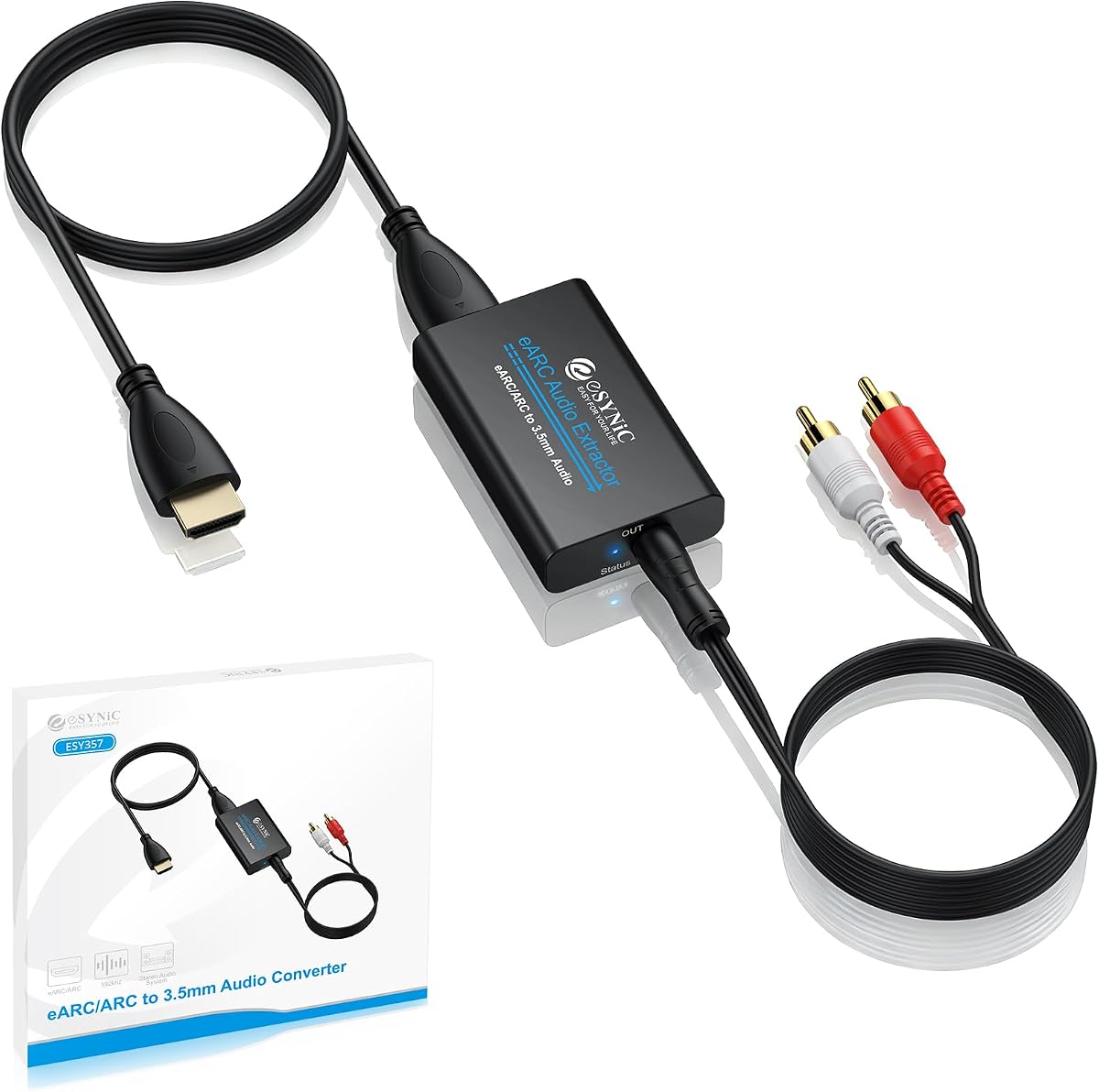
The eSynic Professional Extractor stands out for its visual feedback and high-fidelity capabilities. With a 4.5 rating, it appeals to users who want to verify their connection status immediately upon setup.
We may earn a commission when you buy through this link, at no additional cost to you.
Its ability to handle 24-bit/192kHz sampling ensures that even subtle audio details are preserved when converting digital signals. The presence of dedicated L/R outputs offers flexibility for connecting amplifiers that lack a 3.5mm input.
The main limitation is the exclusion of Dolby and DTS 5.1 decoding, which restricts it to PCM audio. However, for stereo systems or older AV receivers, this limitation is often acceptable given the clean signal processing.
If you need to confirm your setup is working without guessing, the signal indicators make this a top choice. It balances professional features with ease of use, making it ideal for home theater upgrades.
Built-in audio signal indicators eliminate guesswork during setup. You can see immediately if the device is receiving a signal, which is helpful when troubleshooting connection issues with new TV configurations.
Offering both 3.5mm and L/R RCA outputs allows connection to a wider range of speakers. This flexibility ensures you can use almost any analog speaker system without needing additional adapters.
We may earn a commission when you buy through this link, at no additional cost to you.
This premium extractor is designed for high-resolution setups requiring 4K60Hz video pass-through alongside audio extraction. It supports advanced video standards, ensuring your display runs at full capacity while audio is routed separately.
We may earn a commission when you buy through this link, at no additional cost to you.
It supports multiple audio modes including 5.1CH for optical outputs, which is a significant advantage over simpler PCM-only units. This flexibility allows connection to soundbars or home theater systems that require encoded surround formats.
Users may find the configuration slightly more complex due to the need for manual mode switching. The lack of CEC support also means volume control via the TV remote might not work with all connected amplifiers.
For users demanding high bandwidth video support alongside audio extraction, this is a robust choice. It handles modern HDMI 2.0 requirements well, making it suitable for next-gen gaming consoles or 4K media players.
Supporting 4K@60Hz ensures your video signal remains uncompromised when passing through the extractor. This is essential for gaming and HDR content where lower bandwidth extractors might downscale the image.
The optical output supports 5.1-channel audio formats like Dolby and DTS. This allows connection to dedicated home theater receivers that need encoded signals for surround sound playback.
We may earn a commission when you buy through this link, at no additional cost to you.
This converter focuses on delivering clean stereo audio from HDMI ARC ports to traditional amplifiers. With a 4.5 rating, it is praised for its ability to maintain signal quality without introducing hiss or noise.
We may earn a commission when you buy through this link, at no additional cost to you.
The digital noise reduction technology is key to its performance, ensuring a smooth listening experience. It supports up to 192kHz sampling, which captures high-resolution details when your source content supports it.
However, it does not support eARC, limiting it to standard ARC TVs. Users must ensure their TV audio output is set to PCM before use, or they may experience silence or distorted sound.
Ideal for connecting home theater amplifiers or mixers, this extractor simplifies the connection process. It is best suited for those who prioritize audio fidelity over advanced surround sound decoding capabilities.
Built-in digital noise reduction helps eliminate background hiss common in cheap converters. This ensures the audio you hear is pure and clear, especially beneficial for quiet music tracks.
The output works well with audio mixers for recording or streaming setups. This flexibility makes it a useful tool for content creators who need to capture audio from TV sources.
We may earn a commission when you buy through this link, at no additional cost to you.
This compact extractor provides a solid solution for users needing a smaller footprint. It shares similar audio specifications with higher-ranked models but in a smaller physical package.
We may earn a commission when you buy through this link, at no additional cost to you.
It supports high sampling rates up to 192kHz, ensuring good audio quality for stereo systems. The digital noise reduction helps keep the output clean during quiet scenes in movies or music.
Users must set their TV audio output to PCM for this device to function correctly. Without this setting, the device will not extract audio properly, which can confuse first-time users.
Best for desktop setups or small living rooms, this model is easy to hide behind a TV or stand. It offers essential features without extra bulk, making it a practical choice for basic audio extraction needs.
The compact size makes it easy to place in tight spaces behind TVs or cabinets. This helps maintain a clean look while ensuring your audio system remains accessible.
Despite its size, the audio performance remains consistent across different content types. Whether watching TV news or streaming movies, the sound remains balanced and clear.
We may earn a commission when you buy through this link, at no additional cost to you.
This versatile splitter is designed for general HDMI extraction rather than specifically for ARC. It offers flexibility through multiple audio modes, allowing users to switch between stereo and 5.1-channel output.
We may earn a commission when you buy through this link, at no additional cost to you.
It supports 4K@30Hz video throughput, ensuring modern devices like consoles work well. The optical output allows connection to soundbars or receivers that use digital audio connections instead of analog.
However, it does not support ARC or eARC, meaning it cannot extract audio from a TV's return channel. This limits its use to connecting external devices like players or PCs to speakers.
For users with game consoles or Blu-ray players needing audio separation, this is a practical tool. The pass mode ensures video continues to the TV even when audio is being extracted.
With three modes including 5.1CH, you can optimize for different audio setups. This makes it useful for systems that require specific channel configurations for surround sound.
Pass mode ensures your TV screen works even if audio extraction fails. This is crucial for gaming or movies where you need video continuity while troubleshooting audio.
We may earn a commission when you buy through this link, at no additional cost to you.
This extractor stands out due to its integrated 10-foot cable, solving placement issues for distant audio setups. The longer cable allows speakers to be placed further from the TV without signal degradation.
We may earn a commission when you buy through this link, at no additional cost to you.
Constructed with aluminum alloy housing and gold-plated connectors, it offers durability against interference. The 4.0 rating reflects solid performance for stereo output to older amplifiers.
It only supports 2-channel PCM audio, which is typical for 3.5mm outputs. Users must ensure their TV audio is set to PCM to avoid signal loss or silence.
Best for living rooms where speakers are not directly behind the TV, this unit simplifies wiring significantly. It is ideal for connecting legacy amplifiers that lack HDMI inputs.
The 10-foot integrated cable reduces the need for extension wires. This simplifies installation in large rooms where audio equipment is far from the television.
Aluminum alloy housing provides better heat dissipation and protection. This ensures long-term reliability even with daily use in high-traffic living spaces.
We may earn a commission when you buy through this link, at no additional cost to you.
This extractor supports 4K60Hz resolution, ensuring high-quality video passes through while audio is extracted. With a 4.8 rating, users appreciate its reliability for connecting modern gaming consoles and media players.
We may earn a commission when you buy through this link, at no additional cost to you.
It offers optical SPDIF outputs for digital audio, which is useful for connecting to amplifiers or soundbars that lack analog inputs. The DIP switch allows switching between TV ARC mode and standard HDMI input.
Despite the high rating, it does not support volume control or eARC. This means you may need to adjust volume directly on your connected audio system rather than using the TV remote.
Ideal for PS5 or Xbox users needing audio separation, this unit handles high bandwidth well. It is a top choice for those prioritizing video quality alongside audio extraction.
Optical SPDIF outputs allow connecting to devices that require digital signals. This is perfect for home theater receivers that need a digital input for surround sound decoding.
Supporting 4K60Hz ensures your gaming and streaming experience remains sharp. It avoids the common issue of video downscaling when using audio extraction boxes.
We may earn a commission when you buy through this link, at no additional cost to you.
This adapter offers simultaneous L/R and 3.5mm outputs, allowing connection to multiple devices. It supports up to 192kHz sampling, ensuring high-fidelity audio for home theater systems.
We may earn a commission when you buy through this link, at no additional cost to you.
The aluminum metal material provides better heat dissipation and a premium feel. This is useful for long-term stability and reduces interference compared to plastic alternatives.
Without CEC protocol support, volume control may not sync with the TV remote. Users need to adjust volume directly on the amplifier or speakers for a seamless experience.
Best for users needing flexible connectivity for multiple speakers, this adapter is practical and compact. It simplifies connections for complex audio setups without requiring extra power bricks.
Simultaneous L/R and 3.5mm outputs allow connecting both headphones and speakers. This dual capability saves space and reduces the need for splitters.
Aluminum housing ensures durability and thermal stability. This is critical for devices that run continuously without overheating or signal degradation.
We may earn a commission when you buy through this link, at no additional cost to you.
This extractor stands out for supporting volume control via the TV remote, a rare feature for this category. With a 4.5 rating, it provides a seamless user experience for home audio setups.
We may earn a commission when you buy through this link, at no additional cost to you.
It supports Dolby and DTS 5.1 audio output, making it versatile for soundbars and surround systems. The toggle switch allows easy switching between ARC TV input and signal source devices.
While it supports 4K30Hz, it is not ideal for 60Hz high-refresh gaming. However, for standard movie watching and TV shows, the bandwidth is sufficient for most content.
Users who want remote convenience will appreciate this model. It simplifies audio management without sacrificing sound quality, making it a strong contender for living room upgrades.
This feature allows adjusting volume without touching your amplifier. It enhances convenience, especially when sitting far from the speakers or using a wireless remote.
The physical toggle switch simplifies switching between TV and device inputs. This prevents accidental signal loss and allows quick changes between sources.
We may earn a commission when you buy through this link, at no additional cost to you.
Selecting the right extractor requires understanding your TV's ports, audio system capabilities, and specific usage needs. This guide covers essential factors to ensure you purchase a unit that works seamlessly.
Ensure the extractor supports the specific ARC standard your TV uses. Some units only support ARC while others handle both ARC and eARC. If you have a newer TV, eARC support may provide higher bandwidth capabilities even if your system relies on PCM.
Check your TV manual to confirm which port supports ARC. Not all HDMI ports on a TV have return channel capabilities, and using the wrong port will prevent audio extraction.
Look for extractors that offer the connections your existing equipment requires. Some models provide both 3.5mm AUX and RCA L/R outputs, giving you flexibility to connect older amplifiers or modern speakers.
If you plan to connect a soundbar, verify whether it needs analog or digital optical input. Analog extractors are better for older amps while optical extractors suit surround systems.
Most basic extractors only support PCM stereo audio. This is fine for standard TV sound but limits surround sound. Check if you need Dolby or DTS decoding, though this usually requires an optical output rather than 3.5mm.
Higher sampling rates like 192kHz ensure better stereo fidelity for music or high-definition shows. If you prioritize clarity, choose a model that explicitly states high sampling rate support.
Gold-plated connectors and aluminum housings help resist corrosion and heat. Cheap plastic models may degrade faster or suffer signal interference over time. A braided cable jacket also adds protection against bending or wear.
Consider the physical size of the unit. Smaller boxes are easier to hide behind TVs but may overheat if not ventilated well. A compact metal build often offers the best balance.
Most extractors require external power via USB. Ensure you have an available USB port on your TV or a nearby adapter. Some units integrate power cables directly which reduces clutter but limits flexibility if the power brick is far.
Always use the recommended power supply to avoid signal issues. Low-quality adapters may cause static or dropouts in your audio output during quiet scenes.
You will likely need to adjust your TV settings to PCM or LPCM to get sound. Not all TVs handle automatic signal conversion. Knowing how to navigate your TV's audio menu is essential for setup.
Keep your TV remote handy during installation. Some TVs require enabling ARC or CEC manually which can be confusing. Instructions in the product box often include step-by-step TV setup guides.
Integrated cables that bundle HDMI and AUX simplify installation. However, fixed lengths like 3 feet might be too short for wide setups. Consider if you need a longer cable or separate wires for flexibility.
Integrated cables reduce connection points that can fail. If your setup allows it, a single integrated unit is often cleaner and more stable than separate components.
Choose a reputable brand with clear warranty policies. Electronics can fail due to manufacturing defects. A two-year warranty offers better peace of mind than limited one-year coverage found on generic products.
Read customer feedback regarding support responsiveness. Some brands offer replacement services faster than others. Reliable support saves time if the unit fails to work out of the box.
Connect the HDMI input of the extractor to your TV's HDMI ARC port. Ensure the HDMI cable is plugged in securely to avoid signal dropouts. If your TV has multiple ARC ports, try the one closest to your setup for easier wiring.
Connect the 3.5mm or RCA output cable from the extractor to your speaker or amplifier. Plug the USB power cable into a TV USB port or a nearby wall adapter. Never use the extractor without power as it will not extract audio signals.
Turn on your TV and navigate to Sound settings to select PCM or LPCM as the audio format. Use your TV remote to adjust volume levels. If there is no sound, check that the TV ARC is enabled in settings and try restarting the extractor.
Most extractors come without an HDMI cable so you can use your existing one. Some integrated models include the HDMI plug built into the cable structure. Always check the product details to see if an HDMI cable is included before purchasing.
This usually means your TV audio output is not set to PCM. Check your TV settings and change audio output to PCM or LPCM. Also ensure the USB power cable is connected and the HDMI cable is plugged into the ARC port.
Yes if your soundbar supports 3.5mm AUX or RCA inputs. For soundbars requiring optical inputs choose a model with an SPDIF optical port. Standard 3.5mm extractors work best with older amplifiers or simple speakers.
Standard HDMI extractors work with consoles but ARC models only work with TVs. If you are using a PlayStation or Xbox ensure the extractor supports general HDMI input. ARC extractors may not accept console signals directly.
Most 3.5mm extractors only support stereo PCM audio. For surround sound like 5.1CH look for optical extractors that support Dolby or DTS. Check the product specs for channel support before buying.
Not all extractors support remote volume control. Some models with digital pass-through allow TV remote volume adjustment. If your TV does not support CEC you will need to adjust volume on your amplifier directly.
Most modern TVs have USB ports for power. If your TV USB is weak use an external adapter. Ensure you use a standard 5V adapter as high voltage adapters can damage the device.
The extractor will not work because it needs an ARC signal. Check your TV manual to confirm ARC support. Older TVs may need an optical audio output instead. If no ARC exists consider using a different audio cable.
We reviewed ten top extractors offering a range of solutions for analog audio needs. The eSynic Professional model stands out for its high sampling rate and signal indicators making it a top pick for quality conscious buyers.
Prioritize extractors that match your TV's ARC capabilities and speaker inputs. If you need long cabling consider models with integrated cables while optical outputs are better for surround setups.
Always check current prices and availability before buying since deals change frequently. Verify your TV settings to ensure compatibility before installation to avoid returns or wasted time.