
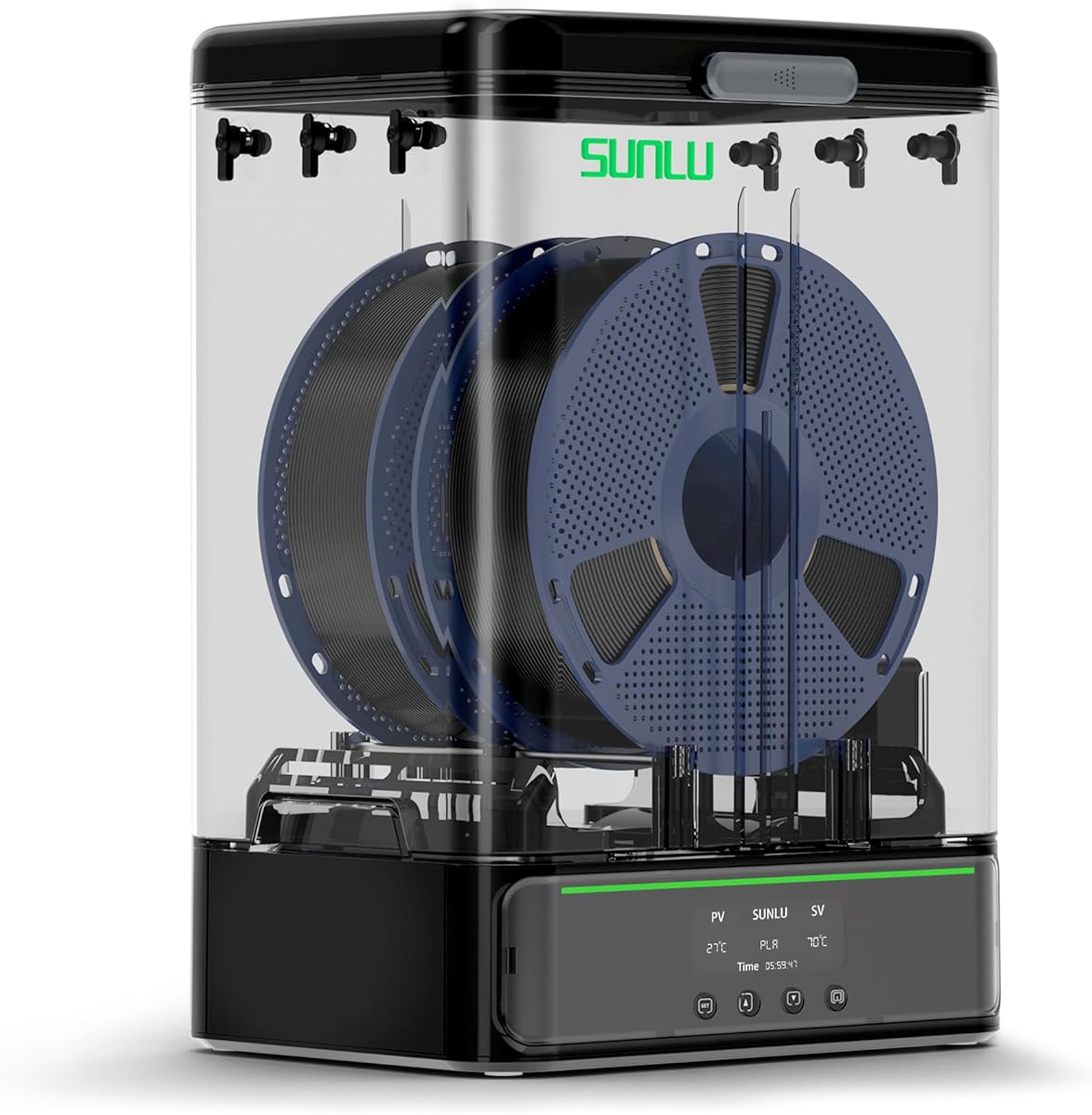
SUNLU S1 Plus Filament Dryer
4.3Editor score
Fan assisted drying
LCD display screen
Wide filament compatibility
This guide compares the top 10 3D Printer Filament Dryer Box models to help you choose the best option for drying and storing your filament effectively.
Choosing the right 3D Printer Filament Dryer Box is essential for maintaining print quality. Moisture in filament causes stringing and clogs, ruining your projects. A good dryer removes humidity while allowing safe storage during printing sessions.
We compared ten leading models based on heating technology, capacity, and user feedback. Our analysis covers everything from budget-friendly options to high-performance units with advanced controls. Each product was evaluated for its ability to protect your investment.
Every pick highlights unique strengths and potential trade-offs for different users. Prices can change frequently, so check current listings before buying. Use this guide to find the perfect dryer for your specific filament needs.
4.3Editor score
4.4Editor score

4.7Editor score
The following table provides a side-by-side comparison of the top-rated filament dryers. Look at capacity, heating methods, and special features to find the model that matches your workflow requirements.




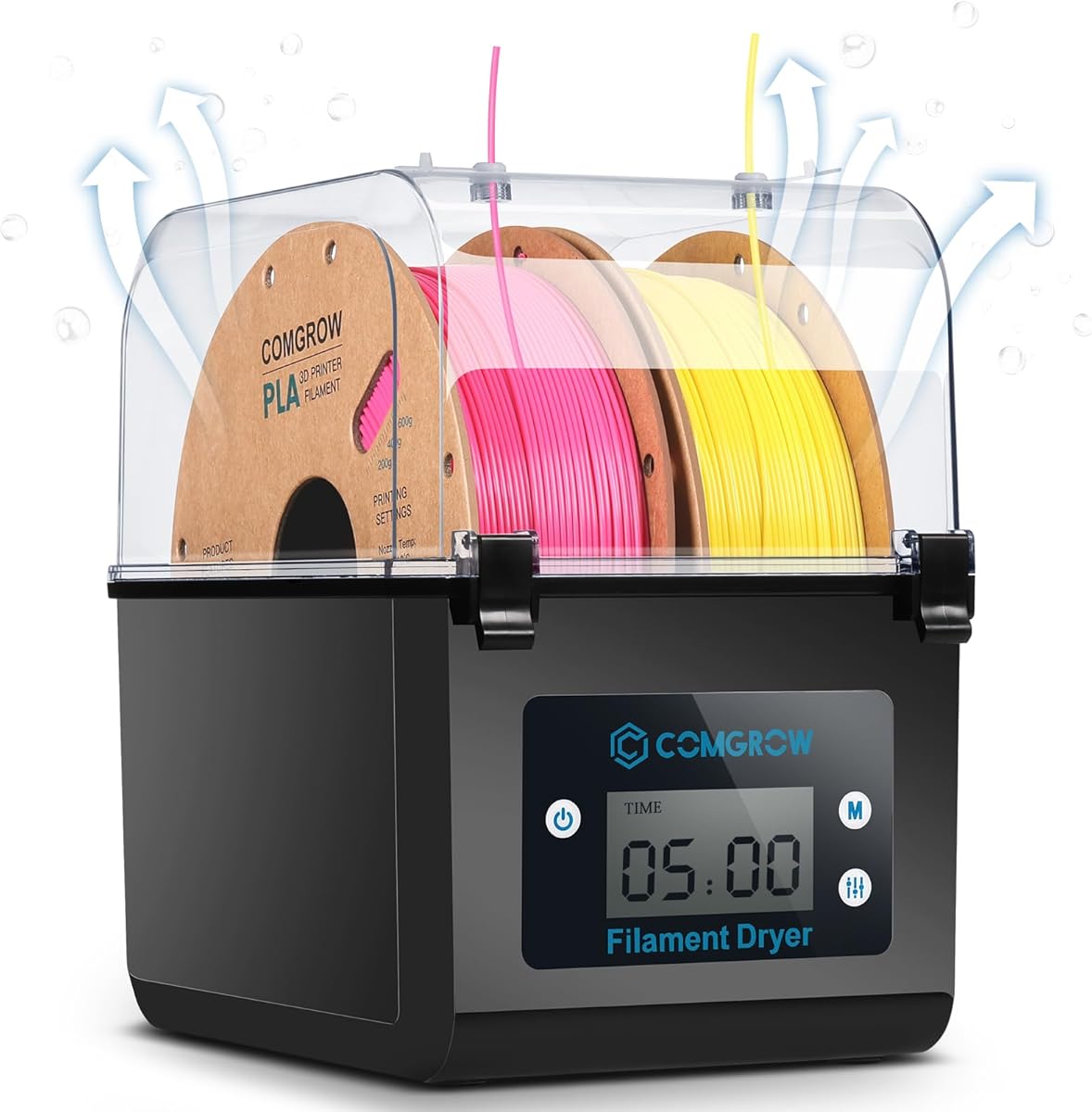
The Comgrow dryer box holds a solid rating and offers a balanced approach to filament care. It features a spacious design that fits two standard spools while maintaining a dry environment during prints.
We may earn a commission when you buy through this link, at no additional cost to you.
Its real-time LCD screen displays temperature and humidity clearly, making it easy to verify conditions. The silicone cable sheath ensures smooth feeding without fraying the filament. This model effectively prevents moisture absorption during long printing sessions.
Users might find the temperature range limited for certain industrial materials. The automatic shut-off after three minutes requires user attention to ensure it stays on during active prints. These trade-offs remain acceptable for general home use.
This dryer suits hobbyists needing reliable moisture protection for multiple spools. It combines affordability with functional design. Choose this model for consistent results with common filaments like PLA and PETG.
Holds two standard 1kg spools at once for convenient multi-print workflows.
Snap button cover and silicone outlets block external humidity effectively.
We may earn a commission when you buy through this link, at no additional cost to you.
This Creality model excels for users managing high volumes of filament. The dual independent chambers allow rapid moisture removal, reducing drying times significantly compared to single-chamber units.
We may earn a commission when you buy through this link, at no additional cost to you.
A temperature range up to 85°C handles demanding materials like ABS and PC. The illuminated window lets you monitor spools without breaking the seal. It ensures your filament stays dry and ready for production runs.
The unit takes up more space than basic boxes and costs more initially. However, the efficiency gained in drying time offsets these drawbacks for serious makers. It remains a strong choice for multi-spindle printers.
High-volume users or shops will appreciate the storage and heating power. It supports a wide range of materials seamlessly. Select this dryer for heavy-duty drying needs and large-scale printing projects.
Two 200W chambers dry filament thirty percent faster than standard models.
Industry-first touch UI allows precise scene customization for various filaments.
We may earn a commission when you buy through this link, at no additional cost to you.
The Space PI SE brings upgraded PTC technology to compact drying. It uses a built-in fan to circulate heat evenly, ensuring the entire spool dries uniformly within minutes.
We may earn a commission when you buy through this link, at no additional cost to you.
Temperature control ranges from 45°C to 65°C, covering most standard filaments. The insulated walls keep heat efficient and prevent surface burns. A simple knob interface makes operation intuitive for new users.
It accommodates only one spool at a time, limiting throughput. The display lacks detailed humidity readings found in pricier models. Despite this, it delivers reliable protection against damp conditions.
Ideal for desktop setups with limited space, this unit performs well. It works with diverse filament types and sizes. Opt for this dryer if you need quick heating without complex features.
Built-in fan circulates hot air 360 degrees for uniform drying.
Thermal cotton walls retain heat and prevent accidental burns.
We may earn a commission when you buy through this link, at no additional cost to you.
This dryer offers extensive control features suitable for advanced users. A 3.7-inch touch screen simplifies adjustments, while presets handle different filament types automatically. Memory saves settings even after power loss.
We may earn a commission when you buy through this link, at no additional cost to you.
The heater provides uniform heat circulation, preventing hot spots on the spool. A 48-hour timer allows long drying cycles without interruption. It supports composite materials like PA-CF for demanding prints.
The single-spool capacity may feel restrictive for larger setups. The feature set adds complexity compared to basic models. However, flexibility benefits users managing diverse material libraries.
Power users needing granular control will find this model valuable. It simplifies complex drying tasks efficiently. Choose this unit for high-performance composites and detailed temperature management.
Recalls previous temperature and material settings after power outage.
One-key presets cover up to twelve different filament types.
We may earn a commission when you buy through this link, at no additional cost to you.
The S1 Plus offers essential drying features at an accessible price point. Its upgraded fan design accelerates moisture removal, making it effective for preventing stringing issues during prints.
We may earn a commission when you buy through this link, at no additional cost to you.
An LCD screen displays temperature, time, and humidity for transparency. It fits standard spools and supports diameters up to 3mm. This versatility allows use with various major brands without issue.
The max temperature limits it to standard filaments like PLA and PETG. It lacks advanced smart features found in premium units. However, it delivers excellent value for entry-level users.
Hobbyists seeking basic moisture control will find it sufficient. It simplifies the printing workflow. Select this model for budget-friendly protection of your filament inventory.
Added fan helps discharge excess water faster than passive units.
Accommodates 1.75mm and 3mm filament diameters effectively.
We may earn a commission when you buy through this link, at no additional cost to you.
This box focuses on passive storage rather than active drying. It creates an airtight seal that locks out humidity, maintaining dry conditions between print jobs. An integrated hygrometer helps track internal air quality.
We may earn a commission when you buy through this link, at no additional cost to you.
It supports printing directly from the sealed box without exposure. Users can add desiccant packs to maintain low humidity. This prevents moisture-related issues like bubbling and uneven layers.
It cannot actively dry wet filament, which limits its initial use. You must ensure filament is dry before placing it inside. However, it excels as a long-term storage solution.
Makers looking for maintenance-free storage will appreciate this design. It keeps filaments ready for future use. Choose this model for protecting filament between jobs.
Sealed enclosure prevents moisture re-absorption when idle.
Built-in hygrometer removes guesswork from humidity levels.
We may earn a commission when you buy through this link, at no additional cost to you.
The SP2 combines active drying with a modular storage system. The detachable base allows you to dry spools then move them to a sealed container. This separates the heating process from long-term storage.
We may earn a commission when you buy through this link, at no additional cost to you.
It heats quickly to 70°C using PTC technology. The roller system supports various spool sizes, including heavy 3kg options. Sealing latches ensure humidity stays out after drying is complete.
The dual-part system is bulkier than single-box units. Moving between modes requires physical effort. Despite this, the flexibility offers significant value for organized workflows.
Users wanting to keep drying and storage distinct will like it. It maintains moisture protection effectively. Select this dryer for versatile handling of larger spools.
Lift apart storage box allows independent drying and storage.
Rollers and holders accommodate 250g to 3kg spool sizes.
We may earn a commission when you buy through this link, at no additional cost to you.
This dryer supports feeding two spools simultaneously via separate outlets. It features improved sealing materials to keep internal humidity low even when unplugged. The PTC heater reaches high temperatures quickly.
We may earn a commission when you buy through this link, at no additional cost to you.
One-key presets handle nine common filament types automatically. Safety mechanisms cut power if the temperature exceeds limits, protecting the unit. These features simplify operation for daily printing tasks.
Lack of humidity monitoring limits precision control. The build feels lighter than premium models. However, the safety and speed make it a practical choice.
Owners of multiple printers will benefit from dual outlets. It ensures both machines stay fed with dry material. Choose this model for reliable multi-printer support.
Dual PTFE ports support two printers at once efficiently.
Thermal cut-offs protect against overheating damage or failure.
We may earn a commission when you buy through this link, at no additional cost to you.
The S4 stands as a top-tier dryer for industrial or prosumer use. It supports four spools simultaneously, enabling multi-color or multi-machine setups. Heating is incredibly fast with a 350W PTC unit.
We may earn a commission when you buy through this link, at no additional cost to you.
Auto humidity control maintains internal levels precisely without manual checks. Triple security layers protect against overheating, ensuring safe operation. It uses three fans to keep temperature balanced across all spools.
The investment cost is higher than average, and it occupies significant space. For most hobbyists, this capacity may be unnecessary. However, production environments demand this level of performance.
Professionals managing large volumes will value this capacity. It ensures uninterrupted printing across multiple machines. Select this dryer for heavy-duty multi-spool operations.
Auto humidity mode adjusts drying cycles based on real-time levels.
Triple fans maintain internal temp within ±3 degrees accuracy.
We may earn a commission when you buy through this link, at no additional cost to you.
This model matches the standard S1 Plus design in a white finish. It operates quietly, producing minimal noise during extended drying cycles. The timer can be set up to 99 hours for custom needs.
We may earn a commission when you buy through this link, at no additional cost to you.
Internal rollers allow printing while drying continues. The screen displays time and temperature clearly. It works with multiple filament brands and sizes effectively. The aesthetic adds visual appeal to any workspace.
It lacks advanced sensors found in premium units. The price may be slightly higher than similar black versions. Despite this, the core drying performance remains reliable.
Users prioritizing quiet operation will appreciate this version. It fits clean, modern desk setups well. Opt for this dryer for aesthetic consistency with your printer.
Ultra-quiet design operates under 10 decibels to reduce noise.
Timer settings range from 1 to 99 hours for flexibility.
We may earn a commission when you buy through this link, at no additional cost to you.
Selecting the right dryer requires understanding your material needs and workspace limits. This guide breaks down key factors to help you make an informed decision.
Look for PTC heaters which distribute heat more evenly than standard resistive pads. Advanced units use 360-degree circulation fans to ensure the entire spool dries uniformly. This prevents cold spots that can trap moisture in the filament.
Aim for a dryer that circulates hot air actively rather than just radiating heat from the bottom.
Consider how many spools you typically need to dry at once. Single-spool models save space but require more frequent rotation. Multi-spool options allow simultaneous drying for multi-color prints.
Choose a box that fits your typical workflow volume to avoid bottlenecks.
Basic filaments like PLA only need 45°C to 55°C. However, engineering materials like ABS or Nylon often require up to 70°C or higher. Ensure the unit covers the specific materials you use regularly.
Verify the maximum temperature matches the requirements of your advanced printing materials.
Some boxes include built-in hygrometers to monitor humidity levels in real time. Others offer auto-modes that adjust cycles based on sensor readings. Manual models require you to guess when drying is complete.
Opt for units with humidity sensors if precise moisture control is critical for your prints.
Effective sealing prevents moisture from entering while printing. Look for silicone outlets that fit your filament diameter snugly. Some units offer dual ports for feeding two printers at once.
Ensure the sealing mechanism keeps the internal environment stable during operation.
Touchscreens provide more control options but knobs are simpler and cheaper. Check if the unit displays both Celsius and Fahrenheit. Preset options for common filaments can save setup time.
Select an interface that matches your comfort level with digital controls.
Flexible timer settings allow you to dry filament for the exact duration needed. Basic units offer short ranges, while advanced models allow up to 48 or 99 hours. This ensures complete drying without over-exposure.
Look for a long timer range to handle various drying conditions easily.
Overheating protection is vital for any heating device. Models with thermal switches or software cutoffs reduce fire risks. Ensure the unit has a sturdy design to prevent tipping.
Prioritize models with automatic temperature cutoffs for safer operation.
Before starting, ensure the dryer box is placed on a flat, stable surface away from direct sunlight. Connect the filament to the outlet port using a Teflon tube if needed. This setup prevents friction that could damage the filament before it enters the printer.
Set the temperature according to your filament type. For PLA, use 45°C, while Nylon may need 70°C. Set a timer for at least six hours to ensure moisture removal. The display should show active heating once powered on.
After the cycle finishes, let the box cool slightly before opening. Keep the outlet plug sealed when not in use to maintain dryness. Regularly check the interior for dust accumulation to ensure proper airflow.
Not every material requires active drying, but PLA, PETG, and ABS benefit significantly from it. Hygroscopic materials like Nylon and Polycarbonate absolutely need a dryer to print successfully. Using one ensures consistent quality across all material types.
You should dry filament at least once a week if it is exposed to high humidity. For spools used frequently, daily drying prevents moisture buildup effectively. Check for stringing as a sign that drying is needed.
Yes, most modern dryers allow you to print while the spool dries inside the box. Just ensure the exit tube feeds directly into your printer's extruder. This continuous workflow saves time and keeps moisture out.
The ideal internal humidity level for dry filament is below 10 percent. Some advanced units allow you to set specific targets to maintain this range. Lower humidity reduces the risk of printing issues like bubbles.
Fans are highly recommended as they circulate hot air around the spool. Passive heating often leads to uneven drying results. Active air circulation ensures the entire length of filament dries uniformly.
Unplug the unit and wipe the interior with a dry cloth to remove dust. Avoid using water or solvents near the electronic components. Keep the silicone ports clean to prevent filament snagging.
The ten models reviewed provide diverse options for every type of 3D printer user. From the budget-friendly SUNLU S1 Plus to the high-capacity Creality Space Pi X4, there is a fit for every workspace.
Prioritize units that match your specific filament needs and temperature requirements. Active heating and humidity monitoring provide the best protection against moisture damage. Invest in a unit that ensures consistent prints over time.
Remember that prices and availability can change daily. Verify current stock and pricing before making your final purchase. Use this guide as a reliable reference for your next filament care upgrade.