
Thrustmaster T-Flight Hotas One Flight Stick & Throttle – XBOX & PC
4.4Editor score
Detachable throttle for flexible setups
Adjustable joystick resistance for comfort
Plug and play compatibility
This guide compares the best flight sticks for the Xbox Series X including throttles and pedals to help you choose the right simulator controller for your
Finding the right flight stick for the Xbox Series X can transform your gaming experience into a realistic simulation adventure. Whether you love commercial aviation or combat jets, a quality controller brings precision and immersion to every mission you undertake.
We evaluated ten top controllers based on build quality, compatibility, and features like vibration feedback and programmable buttons. Our analysis focuses on how each device performs with popular flight sim titles available on the platform today.
Each pick highlights unique strengths so you can match your preferred style. Prices and availability change often so verify current details before purchasing. This list ensures you find a reliable controller that fits your cockpit setup perfectly.
4.4Editor score

4.3Editor score
This table provides a quick side by side overview of all ten flight sticks included in our guide. Compare key specifications at a glance to see which controller offers the features you need for your preferred flight simulation style.


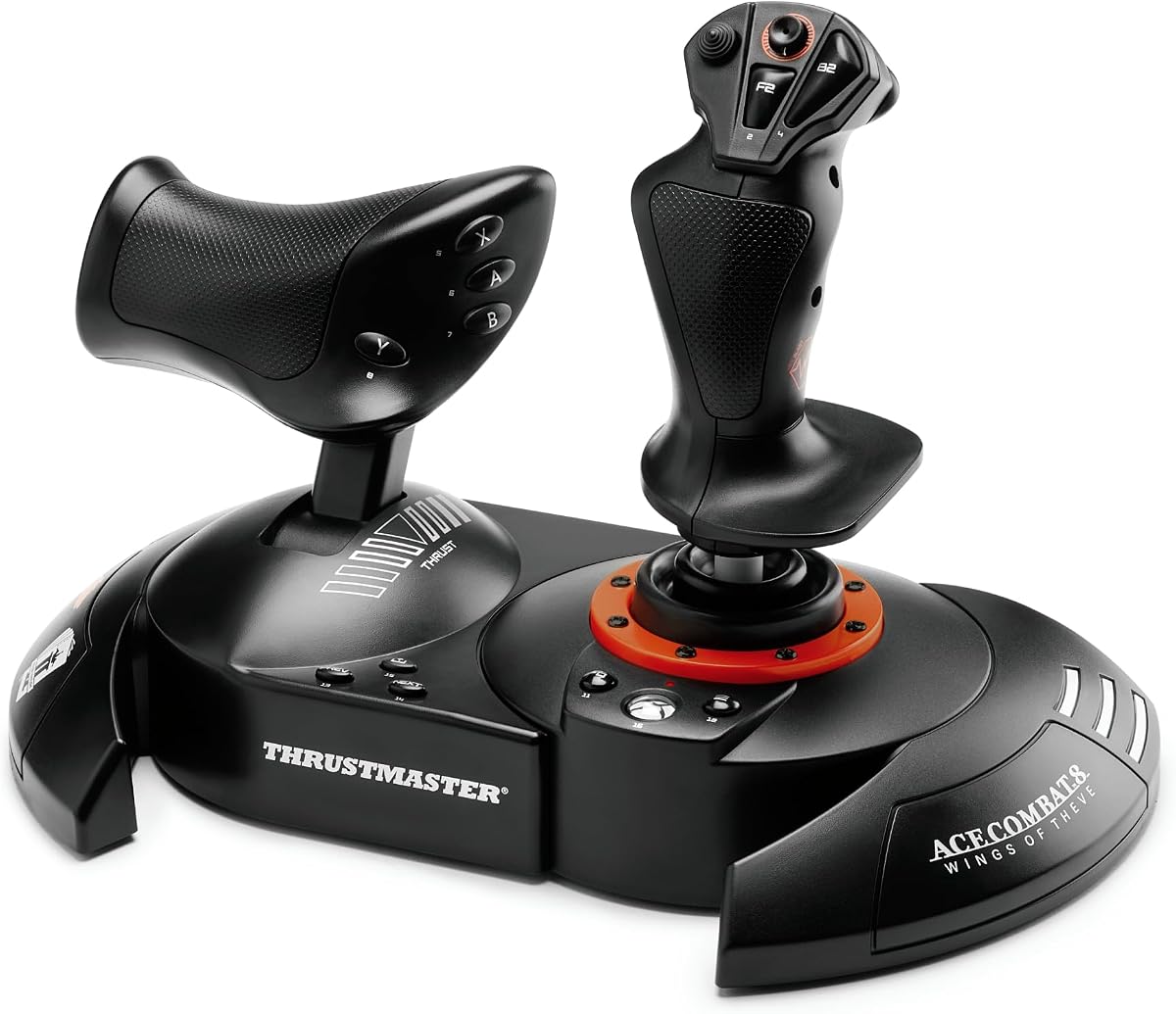
This flight stick offers a realistic simulator control experience at an accessible price. It delivers precision hands on flying with a HOTAS joystick and throttle system designed for immersive gameplay suitable for beginners.
We may earn a commission when you buy through this link, at no additional cost to you.
The ergonomic design features adjustable resistance and responsive triggers for smooth aircraft control. You can use the stick and throttle together or detach them for versatile setups on your lap or desk.
While the build is mostly plastic and lacks vibration, the plug and play USB connection ensures instant compatibility. It works well with most popular flight sim software without complex setup requirements.
Beginner pilots and casual sim enthusiasts should buy this for its value. It provides essential controls for takeoff landing and combat maneuvers making it a solid starting point for your cockpit.
The detachable throttle allows flexible positioning for different play styles and desk sizes.
You can add rudder pedals later using the S.M.A.R.T. sliding rail system for enhanced steering.
We may earn a commission when you buy through this link, at no additional cost to you.
This controller lets you step into the cockpit of legendary pilots with official Ace Combat 8 licensing. It is designed for Xbox Series X and PC offering immediate plug and play readiness for missions.
We may earn a commission when you buy through this link, at no additional cost to you.
Dominate the skies with 16 bit technology and 7 control axes for absolute combat precision. The built in vibration motor ensures you feel every missile impact and turbulence directly in your palm.
The dual rudder system gives freedom via Z axis or throttle lever. H.E.A.R.T. technology guarantees surgical precision that remains consistent even after intense dogfighting sessions.
Combat flight sim enthusiasts should buy this for its precision and feedback. Customize joystick resistance and enjoy ergonomic buttons designed for every aircraft type in the Ace Combat universe.
Proprietary H.E.A.R.T. technology ensures the sensors do not degrade over time.
The detachable throttle lets you rest the joystick on your lap for back to back missions.
We may earn a commission when you buy through this link, at no additional cost to you.
This universal sim controller offers high precision non contact main axes for reliable performance. It features a customizable multi function throttle and flap levers compatible with Xbox Series X and PC.
We may earn a commission when you buy through this link, at no additional cost to you.
With 27 programmable buttons and an integrated OLED flight management display you get full cursor control via touchpad. The intuitive flight configuration wheel makes adjustments easy during sessions.
The ambidextrous design suits fighter jets and airliners with adjustable RGB lighting. Non contact axes reduce wear and maintain accuracy over long term usage in simulations.
Pilots wanting detailed display integration should buy this for its feature set. The touchpad navigation sensor allows full control without needing an extra mouse on your setup.
See real time flight data directly on the controller for better situational awareness.
Left or right hand usage is supported for comfort across different aircraft types.
We may earn a commission when you buy through this link, at no additional cost to you.
This flight sim controls set offers 73 programmable inputs and 15 axes for extensive control. High resolution 16 bit Hall Effect sensors ensure accuracy during flight stick usage.
We may earn a commission when you buy through this link, at no additional cost to you.
A full color display provides real time flight data and quick performance tuning. Swappable dual throttle detents deliver tactile thrust reference points adjustable for your preferences.
The customizable RGB lighting enhances immersion and matches your cockpit style. Adjustable resistance settings ensure comfort during long sessions with left or right handed grip options.
Serious simmers wanting maximum inputs should buy this for its capabilities. The VelocityOne Flight Hangar app enables full customization and personalized settings for your unique needs.
Monitor flight data directly on the unit without switching windows.
Enable or lock twist rudder when using pedals for flexible control modes.
We may earn a commission when you buy through this link, at no additional cost to you.
This kit includes a joystick detachable throttle and rudder pedals with slide rails for consoles and PC. The T.Flight Hotas One features a compact design allowing customized positioning for your space.
We may earn a commission when you buy through this link, at no additional cost to you.
The joystick resistance can be easily adjusted for a great fit with user preferences. T.Flight Hotas One features 14 action buttons and 5 axes plus 3 axes on the TFRP pedals.
This plug and play kit allows for quick super-simple installation with all functions already configured. It is compatible with Xbox Series X and Xbox One and PC right out of the box.
Pilots wanting an all in one solution should buy this for its completeness. Immediate takeoff capability ensures you spend less time setting up and more time flying missions.
The rudder pedals use slide rails for smooth and precise steering input.
No complex setup is required as functions are pre configured for consoles.
We may earn a commission when you buy through this link, at no additional cost to you.
This controller is an ergonomic replica of the Airbus sidestick inspired by controls on iconic airliners. It is officially licensed by Airbus and Xbox Series X|S and compatible with PC.
We may earn a commission when you buy through this link, at no additional cost to you.
Make your existing Thrustmaster Airbus ecosystem compatible with Xbox via simplified connectivity. The New Ecosystem Hub ensures seamless integration with your current flight simulation setup.
You get 21 action buttons with tact switch technology and Xbox configuration. 4 swappable joystick head button modules and 14 remappable buttons offer many possibilities in flight.
Commercial aviation simmers should buy this for its authentic feel. It transforms your setup into a true cockpit experience with buttons designed for ground and flight operations.
Connect your existing Thrustmaster equipment easily with Xbox for a unified cockpit.
Buttons provide tactile feedback for quick identification during critical moments.
We may earn a commission when you buy through this link, at no additional cost to you.
This ergonomic replica is officially licensed by Airbus and Xbox Series X|S for PC. It uses contactless magnetic sensor technology for an unlimited lifespan and optimal precision.
We may earn a commission when you buy through this link, at no additional cost to you.
Enhanced throttle with built-in thrust reverser mechanism adds realism. Rudder control is managed by rotating the sidestick handle which can be locked or unlocked as needed.
The sidestick integrates automatically into Microsoft Flight Simulator 2020 on consoles. 21 action buttons and 14 remappable buttons allow for extensive customization of your controls.
Aviation purists should buy this for its accurate Airbus simulation. It brings professional grade realism to your home setup with features found in real airliners.
No potentiometers means the device will not wear out from normal use.
Built in reverser mechanism simplifies landing procedures without extra hardware.
We may earn a commission when you buy through this link, at no additional cost to you.
This flight equipment features an official Microsoft Flight Simulator license for Xbox Series X|S and PC. It offers 10 bit accuracy with 5 axes including Z axis for precise control.
We may earn a commission when you buy through this link, at no additional cost to you.
Place the product on your lap or detach the throttle from the joystick if playing on a desk. The dual system headliner lets you operate via Z axis or rocker lever.
Ergonomic button configuration with adjustable resistance suits all types of devices. It is compatible with Thrustmaster TFRP rudder pedals for fluid control surfaces and steering.
Pilots focusing on MSFS should buy this for its license integration. It provides complete flight equipment for realistic navigation and operation within the simulator.
Designed specifically for MSFS to ensure all functions work as intended.
Choose between joystick Z axis or throttle lever for rudder control.
We may earn a commission when you buy through this link, at no additional cost to you.
Bring the thrill of a real airplane simulator into your home with this officially licensed Boeing yoke. It is inspired by the iconic Boeing 787 airliner and transforms your setup into a true cockpit.
We may earn a commission when you buy through this link, at no additional cost to you.
The PENDUL_R mechanism replicates pendular movement delivering smooth responsive control. Adjustable spring tension and suspended mechanism give fluid precise yoke flight stick for every maneuver.
Crafted with a 100% metal internal structure it ensures durability and balanced weight. The throttle quadrant controls altitude airspeed and heading for total control with extra axes.
Avid airliner simmers should buy this for its realism. It allows you to experience authentic Boeing controls and professional grade realism like a real pilot in the sky.
Feeling the pendular movement of a Dreamliner adds immense immersion to flights.
100 percent metal internal build ensures the unit lasts for years of flying.
We may earn a commission when you buy through this link, at no additional cost to you.
This stick is designed for Xbox Series X|S and is officially licensed by Microsoft. The chassis opens for easy maintenance and customization allowing you to swap out top housing artwork.
We may earn a commission when you buy through this link, at no additional cost to you.
Assignable buttons include a Share Button Profile Button and Key Lock Mode. It is compatible with Xbox One and Windows 10 providing broad utility across systems.
While not a flight stick it offers precise control and customization. The layout allows some flight sim users to map keys effectively for specific roles.
Gamers wanting flexibility should consider this if they want a customizable option. It may serve as an alternative for those who prioritize modification over simulation features.
Open chassis design makes it simple to clean and maintain the internal components.
Switch out top housing artwork with your own designs for personalization.
We may earn a commission when you buy through this link, at no additional cost to you.
Choosing a flight stick requires understanding several key factors that impact performance and comfort. This section outlines the essential elements to consider before making your purchase.
Ensure the controller is explicitly listed as compatible with Xbox Series X|S. Some older models may work on PC but lack console drivers or certification for seamless gameplay.
Always check that the product supports Xbox Series X|S before purchasing to avoid connection issues.
Decide between HOTAS yoke or sidestick configurations based on your preferred aircraft. Yokes suit airliners while HOTAS setups are ideal for fighter jets and combat scenarios.
Match the controller type to your favorite flight simulator genre for the best experience.
Materials range from plastic to metal internal structures. Metal offers durability and weight but costs more than plastic alternatives found in entry level kits.
Invest in better materials if you plan to use the controller frequently over years.
Hall Effect sensors use magnetic fields to detect position without physical contact. This technology prevents wear and maintains accuracy compared to traditional potentiometers.
Prioritize controllers with Hall Effect sensors for long term reliability.
Look for a high number of programmable buttons and axes to map complex flight functions. More buttons allow greater control over systems like flaps landing gear or weapons.
A higher count of programmable inputs provides more customization for your cockpit.
Detachable throttles and modular designs allow flexible positioning on desks or laps. This feature helps save space and adapts to different seating arrangements comfortably.
Choose a modular design if you need to adjust your setup regularly.
Check if the controller supports adding rudder pedals or other peripherals later. Many systems use specific rails or ports for expanding your ecosystem over time.
Select a system that supports future upgrades to grow your cockpit setup.
Some models include vibration feedback to enhance immersion during flights. Vibration can simulate turbulence or impacts which adds realism to the experience.
Consider vibration feedback if immersion is a high priority for you.
Start by connecting the controller via USB to your console and allowing the system to recognize the device. Most modern flight sticks work plug and play but updating firmware may be necessary for optimal performance.
Calibrate your joystick through the console settings menu to ensure the stick centers correctly. Adjust dead zones if you notice drift or unintended inputs during flight maneuvers.
Clean the device regularly with a soft dry cloth to remove dust from buttons and sensors. Store the stick in a dry area away from direct sunlight to protect the plastic and electronic components.
Yes many flight sticks are designed to work directly with Xbox Series X without a PC. Ensure the product page explicitly lists Xbox Series X|S compatibility before buying to avoid issues.
HOTAS stands for Hands On Throttle And Stick used primarily for fighter jets and combat. Yokes mimic airliner steering wheels and are better suited for commercial aviation simulation.
Many of these controllers support rudder pedals via expansion ports. Check the product specifications to confirm if pedals are sold separately or included in the bundle.
Hall Effect sensors are generally better because they do not wear out like potentiometers. They offer consistent accuracy over time which is ideal for long term flight sim usage.
You can customize mappings using the controller settings menu or dedicated software apps. Some brands provide specific apps for detailed customization of your flight controls.
Not necessarily many flight sticks come with detachable throttles that can be placed on your lap. This design offers flexibility for different seating arrangements without a desk.
Thrustmaster T.Flight Hotas One Microsoft Flight Simulator Edition is specifically licensed for MSFS. However most compatible sticks will work well with the game.
It is not critical but adds immersion by simulating turbulence and impacts. Basic models lack this feature but still offer precise control for flight tasks.
We reviewed ten flight sticks ranging from entry level kits to premium yokes. The Thrustmaster T.FLIGHT HOTAS NEO offers a balanced experience while the TCA Yoke Boeing Edition provides high end realism.
Prioritize features like Hall Effect sensors and modularity to ensure comfort and precision. Match the controller type to your preferred aircraft for the most enjoyable gameplay experience.
Remember that prices and availability change frequently on Amazon. Check current listings for the most accurate details before finalizing your purchase today.