
EPOMAKER Ajazz AK820 Pro
4.7Editor score
75% compact layout design
TFT display interface
Wireless tri-mode connectivity
This guide compares the top 10 Epomaker keyboards for gaming and work, featuring wireless options, gasket mounts, and custom screens.
Epomaker keyboards have become a staple for enthusiasts seeking high-quality mechanical boards without breaking the bank. These devices offer premium features like gasket mounting, hot-swappable switches, and vibrant RGB lighting across various layouts.
We evaluated each model based on build quality, typing feel, wireless performance, and customization options. Our analysis focuses on real-world usability for gamers and professionals who need reliable peripherals for daily tasks.
Each pick highlights specific strengths such as battery life, screen integration, or switch types. Please note that product availability and pricing may change over time, so verify details before purchasing your new device.
4.7Editor score
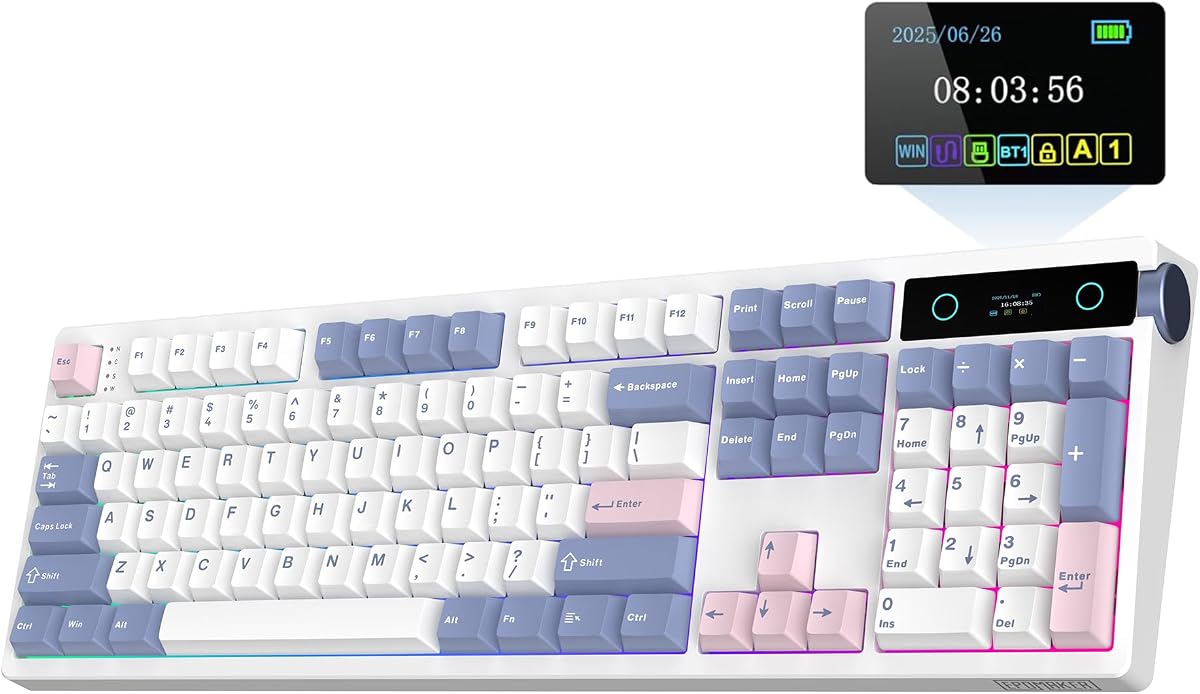
4.7Editor score
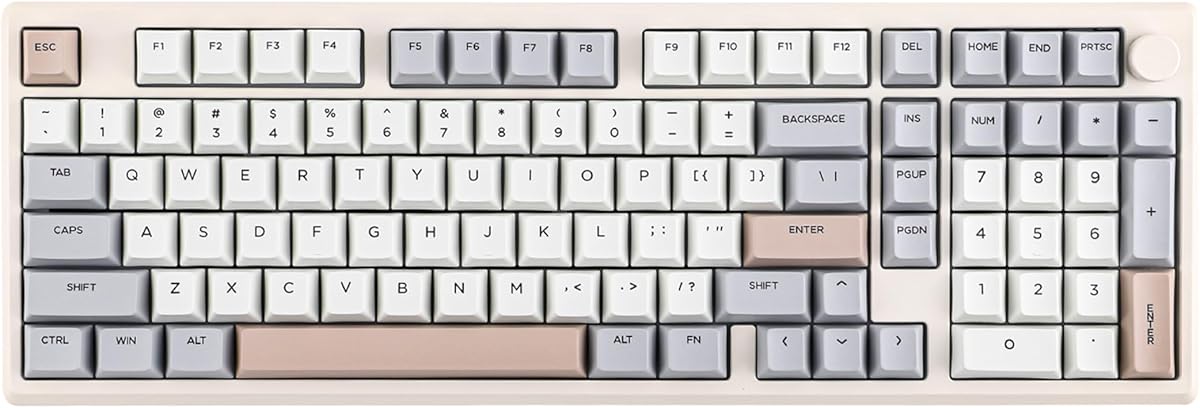
4.5Editor score
This side-by-side comparison highlights key specifications across all ten models to help you decide which layout and feature set fits your specific workflow needs.


The EPOMAKER TH108 PRO stands out as a top-tier full-size keyboard for users who demand both functionality and style. With a rating of 4.7, it offers a premium experience driven by its massive 10000mAh battery and integrated smart screen.
We may earn a commission when you buy through this link, at no additional cost to you.
Its standout qualities include a sophisticated display for time and battery monitoring, plus a volume knob that doubles as a control mechanism. The gasket mount design ensures a soft typing feel, while the hot-swappable PCB allows you to customize your acoustic profile without tools.
While it is heavier than smaller boards due to its robust build, the stability it provides is essential for intense gaming sessions. The screen adds a layer of customization that keeps you engaged with your setup without needing to look away from your screen.
If you need a full-size keyboard that doesn't compromise on wireless performance or build quality, this model is an excellent choice. It balances traditional layout utility with modern tech features effectively.
With 10000mAh capacity, this keyboard supports up to 200 hours of use, ensuring you rarely need to recharge.
The built-in screen lets you show GIFs or system stats, adding a unique visual layer to your desk setup.
We may earn a commission when you buy through this link, at no additional cost to you.
The EPOMAKER X Aula F75 MAX combines a compact footprint with high-end features like a TFT screen and gasket mounting. It earns its reputation through a satisfying creamy sound and versatile connectivity options for both work and gaming.
We may earn a commission when you buy through this link, at no additional cost to you.
Its key strengths lie in the ergonomic design with a 2cm low front height, reducing wrist strain during long typing sessions. The factory-lubed switches provide a consistent feel out of the box, while the flexible plate enhances typing comfort significantly.
Although the TFT screen is a highlight, it does require software interaction to fully utilize. Additionally, users needing a full numpad might find the 75% layout restrictive. However, for those wanting a balance of space saving and features, it fits well.
Buyers looking for a stylish, functional wireless keyboard with a modern look will appreciate this model. It delivers a premium typing experience in a smaller form factor that suits most desk setups.
The 2-stage kickstand and low front height ensure a comfortable typing position for extended use.
Internal foams and pads eliminate hollow noises, resulting in a rich, pleasant acoustic experience.
We may earn a commission when you buy through this link, at no additional cost to you.
The EPOMAKER Galaxy100 QMK offers a premium aluminum build that appeals to enthusiasts wanting durability and customizability. Its support for QMK/VIA software makes it a powerful tool for advanced users seeking total control over their layout.
We may earn a commission when you buy through this link, at no additional cost to you.
Key strengths include the 8000mAh battery for long wireless use and the pre-lubed switches that ensure a smooth typing experience immediately. The aluminum shell provides a solid, high-end feel, while the gasket mount adds a layer of comfort.
The main trade-offs are the weight and cost compared to plastic alternatives. However, the robust construction and advanced software support justify the investment for power users who value build quality and customization deeply.
If you prioritize build materials and software flexibility in your setup, this keyboard is a standout choice. It bridges the gap between office ergonomics and gaming performance effectively.
VIA software allows endless layering and macro editing for maximum workflow efficiency.
The aluminum case provides durability and a weighty stability that reduces movement during typing.
We may earn a commission when you buy through this link, at no additional cost to you.
The EPOMAKER TH108 V2 PRO is engineered for elite gamers who need high performance without sacrificing comfort. It combines a full layout with a smart screen and knob, offering both utility and style for demanding sessions.
We may earn a commission when you buy through this link, at no additional cost to you.
Its performance shines with a 2ms latency and 1000Hz polling rate, ensuring swift execution of complex in-game maneuvers. The gasket mount design cushions shocks, providing a comfortable typing feel that reduces fatigue over time.
While the software relies on Chrome and may not support offline editing as robustly as local apps, the screen customization remains a major draw. It allows for visual flair that matches your rig without cluttering your desk.
Gamers and hybrid users seeking a full-size keyboard with wireless convenience and modern features will find this model compelling. It delivers stability and responsiveness required for competitive play.
A 1000Hz polling rate ensures rapid response times for competitive gaming scenarios.
Upload GIFs or drawings to the screen to personalize your workspace and display real-time stats.
We may earn a commission when you buy through this link, at no additional cost to you.
The EPOMAKER TH99 PRO combines a 96% layout with a massive battery and screen integration, making it ideal for productivity and gaming alike. It offers a compact size without sacrificing the essential numpad functionality.
We may earn a commission when you buy through this link, at no additional cost to you.
Its strengths include a 10000mAh battery that supports 150-200 hours of use and a hot-swappable PCB for customization. The gasket mount design provides a soft, cushioned feel that absorbs vibrations effectively.
The weight of over 1.2kg ensures stability but may make it less portable for travel. Additionally, the 96% layout can be tight on some small desks. However, for stationary setups, it delivers excellent functionality.
Those needing a numpad but wanting to save space will appreciate this balanced design. It offers premium features like wireless connectivity and a customizable screen in a manageable footprint.
The 96% layout retains arrow keys and a numpad while saving desk space compared to full-size boards.
A 10000mAh battery ensures you can work or game for weeks without needing a recharge.
We may earn a commission when you buy through this link, at no additional cost to you.
The EPOMAKER TH108 offers a reliable full-size wireless experience with a strong emphasis on battery life and acoustic quality. It features a creamy gasket mount that delivers a soft typing feel and pleasing sound.
We may earn a commission when you buy through this link, at no additional cost to you.
Key strengths include a 10000mAh battery providing up to 160 hours of wire-free use and factory-lubed switches for smooth keystrokes. The hot-swappable PCB allows users to easily swap switches to refine their setup.
While the pink aesthetic might not appeal to everyone, the functionality remains top-tier. The basic driver software is a minor drawback compared to more advanced options, but it gets the job done for most users.
If you prioritize long battery life and a soft, quiet typing experience in a full-size format, this model is a solid contender. It is ideal for office work or casual gaming without the hassle of cables.
With 160 hours of battery life, you can use this keyboard for weeks on a single charge.
Five layers of padding ensure a creamy, consistent sound profile that enhances typing satisfaction.
We may earn a commission when you buy through this link, at no additional cost to you.
The EPOMAKER G84 HE leverages Hall Effect technology to deliver unmatched speed and precision for competitive gamers. With 8K polling and adjustable actuation, it provides a significant performance edge over traditional mechanical boards.
We may earn a commission when you buy through this link, at no additional cost to you.
Its key strengths include a 0.125ms latency and adjustable actuation travel from 0.1 to 3.3mm for precise control. The SOCD logic ensures fast inputs, while the magnetic switches eliminate physical contact for durability.
The 80% layout is compact, lacking a numpad, which may limit productivity for some users. However, the advanced features justify this limitation for gamers focused on FPS or rhythm games. It is a niche but powerful tool.
If speed is your priority, this keyboard offers a unique advantage in input precision. It delivers professional-level performance in a wireless package that is easy to transport.
An 8000Hz polling rate ensures every keystroke is registered instantly for fast-paced games.
Adjust actuation distance to suit your style, allowing for rapid key presses with minimal movement.
We may earn a commission when you buy through this link, at no additional cost to you.
The EPOMAKER TH99 provides an accessible custom keyboard with a sleek design and solid wireless performance. It balances cost and quality effectively, offering a gasket mount feel at a competitive price point.
We may earn a commission when you buy through this link, at no additional cost to you.
Its strengths include a gasket mount structure for a soft typing feel and a massive 8000mAh battery for long wireless use. The Cherry profile keycaps add ergonomics, while the 102 south-facing LEDs provide bright customization.
Without a screen or knob, it lacks some of the visual flair found in higher-end models. However, it excels in basic productivity and gaming functions. The value it offers is hard to match for budget-conscious buyers.
Those seeking a reliable, no-frills mechanical keyboard with a modern aesthetic will find this model perfect. It delivers a premium feel without the premium price tag.
A 96% layout with dedicated function keys ensures high productivity without taking up excessive space.
Gasket mounting and sound-dampening layers create a comfortable and quiet typing experience.
We may earn a commission when you buy through this link, at no additional cost to you.
The EPOMAKER Ajazz AK820 Pro brings a TFT display and modern features to a budget-friendly price point. It is an excellent option for those wanting visual customization without spending heavily on a premium keyboard.
We may earn a commission when you buy through this link, at no additional cost to you.
Its key strengths include a compact 75% layout that saves desk space and a gasket mount design that enhances comfort. The TFT screen allows for battery status and visual customization, adding a unique touch.
While the battery life is lower than some other models, the 4000mAh capacity still supports solid usage. The build quality is reliable but standard, making it a practical choice for casual users.
If you want a stylish, compact keyboard with a screen for less, this is a top recommendation. It offers great value for daily tasks and gaming alike.
The TFT screen serves as an interactive hub for real-time system updates and status monitoring.
A compact 75% design maximizes desk space while retaining essential keys for productivity.
We may earn a commission when you buy through this link, at no additional cost to you.
The EPOMAKER x Aula F99 offers a space-saving 96% layout with hot-swappable switches and robust wireless capabilities. It is ideal for users who want a compact form factor without sacrificing essential functionality.
We may earn a commission when you buy through this link, at no additional cost to you.
Its strengths include an 8000mAh battery for extended use and a single-key slotted PCB that improves feedback. The gasket mount design ensures a resilient typing feel, while the dual-tone PBT keycaps resist wear.
Lacking a screen or knob, it focuses on pure typing and gaming utility. The plastic shell is durable but less premium than aluminum options. However, for the price, it delivers reliable performance.
If you need a reliable, compact keyboard that balances work and play effectively, this model fits well. It offers strong value for everyday use with a touch of customization.
A 96% layout keeps arrow keys and a numpad while reducing desk footprint significantly.
Hot-swappable sockets allow you to easily change switches to match your preferred feel.
We may earn a commission when you buy through this link, at no additional cost to you.
Choosing the right keyboard involves evaluating layout, connectivity, build quality, and features to match your specific needs.
Epomaker offers keyboards ranging from full-size to 75% layouts. Full-size boards like the TH108 PRO are best for users who need a numpad for data entry. Compact models like the F75 MAX save desk space and are portable for travelers. Consider your workspace size and whether you use the numpad daily before deciding.
Choose a layout that fits your desk space and workflow requirements efficiently.
Most modern keyboards support tri-mode connectivity including Bluetooth, 2.4Ghz wireless, and wired USB-C. Wireless modes offer flexibility for multi-device switching, while wired modes ensure zero latency for competitive gaming. Check battery life if you plan to use wireless extensively.
Select a model with versatile connectivity that supports your devices and usage scenarios.
Mechanical switches vary by tactile feedback and sound. Linear switches are smooth and quiet, tactile switches offer a bump, and clicky switches are loud. Hot-swappable boards allow you to change switches later. Pre-lubed switches provide a consistent out-of-box experience.
Prioritize a switch type that matches your preference for sound and tactile feedback.
Materials like aluminum shells offer durability and a premium feel, while plastic is lighter and more affordable. Gasket mounting reduces vibration and improves comfort. Check for PBT keycaps which resist shine better than ABS. A solid build ensures longevity and stability during intense use.
Invest in a build quality that provides stability and durability for long-term use.
Wireless keyboards come with battery capacities ranging from 4000mAh to 10000mAh. Larger batteries support longer usage without charging, which is critical for users who forget to charge devices often. RGB lighting consumes more power, so consider this when choosing a model.
Look for a battery life that supports your daily usage without frequent recharging.
Software support allows remapping keys, creating macros, and adjusting RGB. Some models support QMK VIA for deep customization. Models with screens offer additional flair like GIF display. Ensure the software works on your OS to utilize all features effectively.
Choose a model with software that offers the level of customization you need.
Prices vary based on features like screens, materials, and wireless capabilities. Higher-end models offer more durability and advanced features. Budget options provide solid basics. Determine which features are essential versus nice-to-have to find the best value.
Balance your budget with the features that matter most to your daily tasks.
South-facing LEDs provide brighter per-key illumination. RGB lighting allows for personalization. Some boards have integrated light bars. Consider how much lighting you want for your setup. Aesthetics play a role in desk appeal and satisfaction.
Select a lighting style that complements your desk setup and personal taste.
To ensure longevity, keep your keyboard clean by using compressed air to remove dust and debris from keycaps and switches. Regularly wipe the surface with a soft cloth to prevent grease buildup on keycaps.
For wireless models, store the receiver in the kickstand slot or a safe place to prevent loss. Charge the keyboard fully before first use and try to recharge before the battery is completely depleted to maintain battery health.
Customize your layout using the provided software to remap keys or create macros. This enhances productivity. If you enjoy tinkering, swap switches periodically to refresh the typing feel without buying a new board.
Yes, Epomaker keyboards offer fast response times with features like 1000Hz polling and low latency wireless modes. Many models include anti-ghosting and NKRO support, making them suitable for competitive gaming and casual play alike.
Most Epomaker keyboards are fully compatible with both Mac and Windows operating systems. They include dedicated keys or switchable modes to ensure functionality across different platforms and devices.
RGB lighting is customizable through the manufacturer's software. You can adjust colors, brightness, and effects to match your setup. Some models also allow direct control via hardware keys or on-screen menus.
Gasket mounting isolates the PCB from the case using rubber or silicone gaskets. This reduces harsh vibrations and provides a softer, more comfortable typing experience. It is a premium feature that enhances sound and feel.
Most Epomaker models are hot-swappable, allowing you to change switches without soldering. You can swap between 3-pin or 5-pin switches depending on the model's PCB compatibility to customize your typing feel.
Battery life varies from 40 to 200 hours depending on usage and RGB settings. Models with larger batteries like 10000mAh offer longer use between charges, ensuring uninterrupted work and gaming sessions.
We reviewed ten top models including the TH108 PRO and Galaxy100 QMK, each offering unique features like screens, advanced connectivity, and premium builds. These keyboards provide excellent value for both gamers and professionals.
Prioritize features that align with your needs, whether that is a specific layout, long battery life, or gasket mounting. Selecting the right board ensures a comfortable and efficient workflow for years to come.
Remember to check current pricing and availability before making your final decision. Our guide aims to help you find the perfect tool for your desk setup at the best value.