
LGA 1155 Motherboard H61
5.0Editor score
Supports Intel Core 2nd and 3rd Gen
Includes M.2 interface for SSD
VGA and HDMI video outputs
Compare the top ten cheap motherboards for AMD and Intel platforms to find the best budget build option for your next PC upgrade or new system.
Finding a cheap motherboard does not mean sacrificing quality or reliability for your next computing project. You need a board that supports your processor, offers decent connectivity, and stays within a strict budget without cutting corners on critical components.
We analyzed ten highly rated options across different socket types and price points to identify the best value propositions. This list includes boards for AMD Ryzen and Intel Core processors, ranging from entry-level AM4 models to modern AM5 and LGA1700 platforms.
Each pick shows specific strengths like power delivery, connectivity ports, or expansion slots to help you match the hardware to your needs. Please note that prices change frequently, so verify current costs before making your final purchase decision.
5.0Editor score
4.5Editor score

4.5Editor score
This side-by-side comparison highlights the key specifications and features of all ten budget-friendly boards to help you decide which architecture fits your requirements.





The GIGABYTE B550M K stands out as a highly accessible option for builders looking to upgrade or build on a tight budget. With a strong rating and broad Ryzen compatibility, it offers the essentials without unnecessary bloat.
We may earn a commission when you buy through this link, at no additional cost to you.
Its digital 3+3 VRM design ensures steady power delivery for supported processors, while the inclusion of PCIe 4.0 allows for next-gen GPU and SSD performance. The two M.2 slots provide ample room for fast storage.
While it lacks premium features like advanced cooling or onboard Wi-Fi, these trade-offs are acceptable given the low price. The Q-Flash utility simplifies BIOS updates even when you cannot boot normally.
This board is ideal for users prioritizing value and modern AMD Ryzen support. If you need a reliable foundation for a budget gaming or productivity PC, this model is a top recommendation.
It supports Ryzen 5000, 4000, and 3000 series processors directly for flexible upgrade paths.
Dual M.2 slots allow you to install multiple high-speed NVMe drives alongside traditional storage.
We may earn a commission when you buy through this link, at no additional cost to you.
For users needing a functional board for legacy systems or specific industrial applications, this H61 model offers remarkable utility at an incredibly low cost. It brings modern M.2 storage to older Intel platforms.
We may earn a commission when you buy through this link, at no additional cost to you.
The board supports a wide range of Intel 2nd and 3rd Gen Core processors as well as Xeon E3 variants. Dual-channel DDR3 slots provide standard memory speeds suitable for basic computing tasks.
It includes HDMI and VGA ports for display connectivity without needing a dedicated graphics card. However, the absence of a manual and reliance on older chips require careful planning for drivers.
This option is strictly for those repurposing old components or needing a specific legacy solution. For modern builds, newer platforms offer better performance and efficiency per dollar.
It enables use of older Xeon and Core i7/i5/i3 processors with new storage interfaces.
Built-in HDMI and VGA allow for direct monitor connection if the CPU has integrated graphics.
We may earn a commission when you buy through this link, at no additional cost to you.
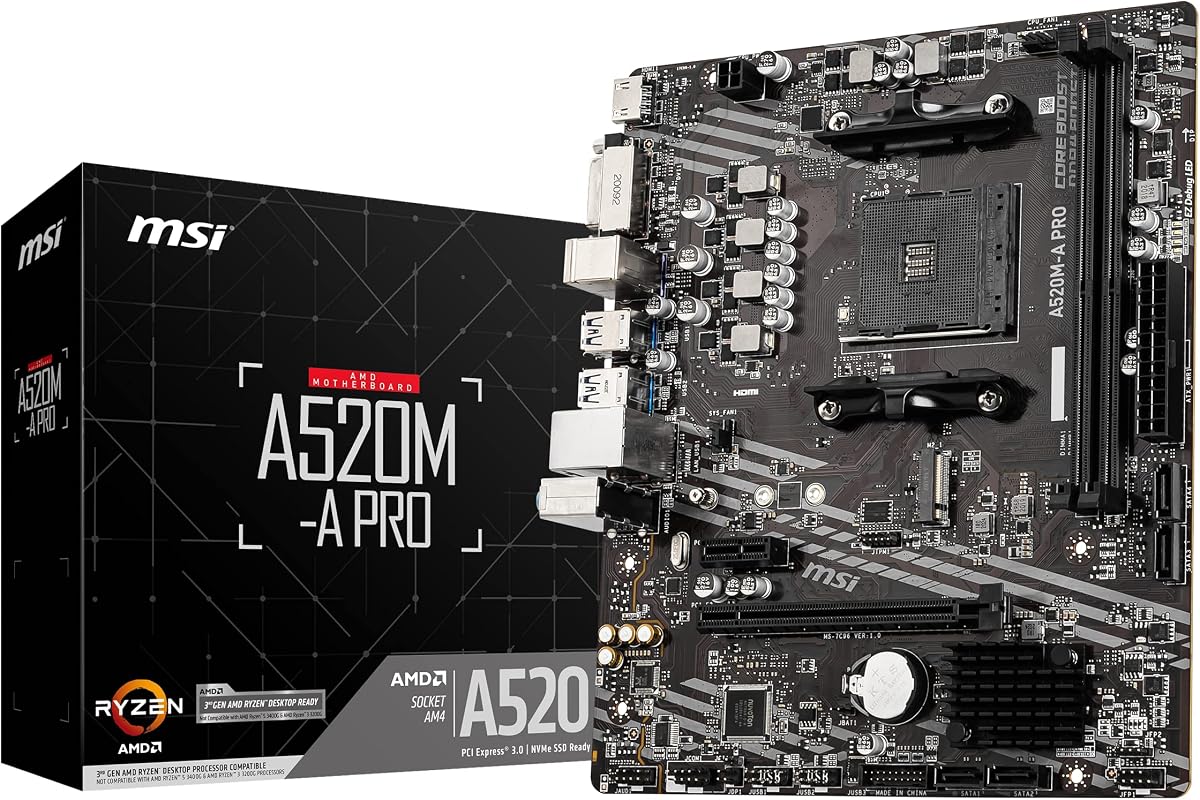
The MSI A520M-A PRO delivers a clean and reliable platform for AMD Ryzen 5000 processors without the cost of higher-tier chipsets. It focuses on essential features needed for a functional build.
We may earn a commission when you buy through this link, at no additional cost to you.
Its Turbo M.2 slot runs at PCIe Gen3 x4 for excellent SSD speeds. Audio Boost provides studio-grade sound for gaming and media consumption without external hardware.
While it lacks PCIe 4.0, the performance difference is minimal for most users. The board supports high-speed memory overclocking, giving you flexibility to tune your RAM.
If you want a straightforward board for a budget gaming PC, this is an excellent choice. It balances cost and capability perfectly for entry-level enthusiasts.
Supports DDR4 memory up to 4600 MHz overclocked for faster data processing.
Includes USB 3.2 Gen 1 ports for fast peripheral data transfer speeds.
We may earn a commission when you buy through this link, at no additional cost to you.
ASRock packs significant features into this budget-friendly board, including high-speed memory support and robust power delivery. It offers flexibility for users who need more ports without paying a premium.
We may earn a commission when you buy through this link, at no additional cost to you.
The 6 power phase design with premium chokes ensures stable performance for supported CPUs. Legacy display outputs like DVI and VGA ensure compatibility with older monitors and office setups.
While it lacks modern Wi-Fi or Thunderbolt, its wired connectivity is comprehensive. The protection features guard your hardware against electrical surges effectively.
This board is ideal for users needing multiple USB connections and stable power. It balances cost with practical features well for mixed usage scenarios.
6 Power Phase design with 50A chokes ensures stable delivery for modern CPUs.
Six USB 3.2 Gen1 ports allow multiple peripherals without extra hubs.
We may earn a commission when you buy through this link, at no additional cost to you.
This PRO series board focuses on thermal management and power stability for everyday performance. It brings Core Boost technology to optimize voltage delivery for your CPU.
We may earn a commission when you buy through this link, at no additional cost to you.
The Frozr AI cooling feature automatically adjusts fan settings based on system temperatures to keep noise low. Two M.2 connectors provide one Gen4 and one Gen3 slot for storage.
Network connectivity is handled by a reliable Gigabit LAN controller. The board prioritizes essential performance features over aesthetic extras.
It suits users who need quiet operation and stable performance for work or gaming. The thermal solutions ensure your hardware stays cool under load.
Frozr AI cooling adjusts fans automatically to balance performance and noise.
Includes both Gen4 and Gen3 M.2 slots for flexible storage configurations.
We may earn a commission when you buy through this link, at no additional cost to you.
This board adds wireless connectivity to the reliable PRO series, making it perfect for modern builds where cables are limited. The Flash BIOS Button allows updates without a CPU installed.
We may earn a commission when you buy through this link, at no additional cost to you.
Steel Armor protects the main PCIe slot from damage during heavy GPU installation. Premium thermal pads and copper layers ensure efficient heat dissipation for consistent performance.
Audio Boost delivers immersive sound quality for gaming and media. The Flash BIOS feature simplifies upgrading the firmware for newer processors.
Choose this if you need Wi-Fi and solid protection without spending on premium boards. It balances convenience with durability for most users.
Update BIOS without CPU or RAM installation using a simple USB flash drive.
2oz thickened copper and high-quality pads improve heat dissipation efficiency.
We may earn a commission when you buy through this link, at no additional cost to you.
GIGABYTE brings premium power delivery to a budget-friendly price point with this Gaming X V2 model. The Digital Twin 10+3 phase design provides excellent stability for demanding Ryzen processors.
We may earn a commission when you buy through this link, at no additional cost to you.
Integrated I/O Shield simplifies installation and protects ports during transport. Q-Flash Plus lets you update BIOS without installing components, saving time during assembly.
Front USB-C connectivity keeps your desktop organized and supports modern peripherals. RGB Fusion allows you to customize lighting without external controllers.
This board is ideal for users wanting high-end power on a budget. It supports overclocking and high-end GPUs effectively for long-term use.
Digital Twin 10+3 Phase design ensures steady power for high-performance CPUs.
Integrated I/O Shield protects ports and simplifies case installation.
We may earn a commission when you buy through this link, at no additional cost to you.
A520MK V2 offers a streamlined solution for compact builds and budget PCs without sacrificing core performance. It supports high-speed RAM upgrades for faster application response.
We may earn a commission when you buy through this link, at no additional cost to you.
The board includes essential connectivity like HDMI and D-Sub for office or home use. M.2 support ensures you can utilize modern fast storage devices.
USB 3.2 ports provide sufficient bandwidth for peripherals and external drives. Its small size fits easily into space-constrained cases.
If you need a minimal board for general computing, this fits the bill well. It avoids unnecessary complexity for straightforward daily tasks.
Micro ATX format is ideal for compact cabinets and medium-sized builds.
DDR4 memory support enables high-speed RAM upgrades for better performance.
We may earn a commission when you buy through this link, at no additional cost to you.
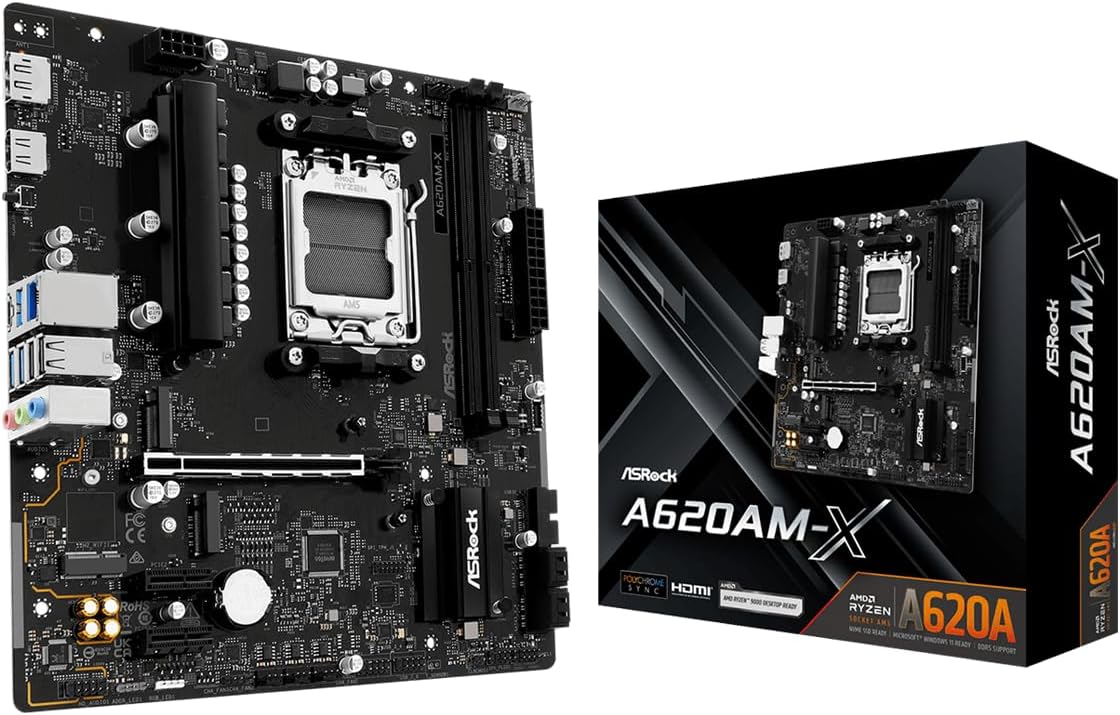
This board offers the most affordable entry into the AM5 platform, supporting the latest Ryzen processors. It ensures future compatibility for users planning long-term upgrades.
We may earn a commission when you buy through this link, at no additional cost to you.
DDR5 support allows for extremely fast memory speeds, enhancing overall system responsiveness. The BIOS Flashback feature simplifies updates to support newer CPUs without a current one installed.
Realtek 2.5G LAN provides faster wired networking for seamless online experiences. While the VRM is basic, it handles supported CPUs efficiently.
Choose this if you want to join the AM5 ecosystem without overspending. It balances modern features with an accessible price point.
Supports Ryzen 9000, 8000, and 7000 series for future compatibility.
DDR5 slots support overclocked speeds up to 8000+ for fast data access.
We may earn a commission when you buy through this link, at no additional cost to you.
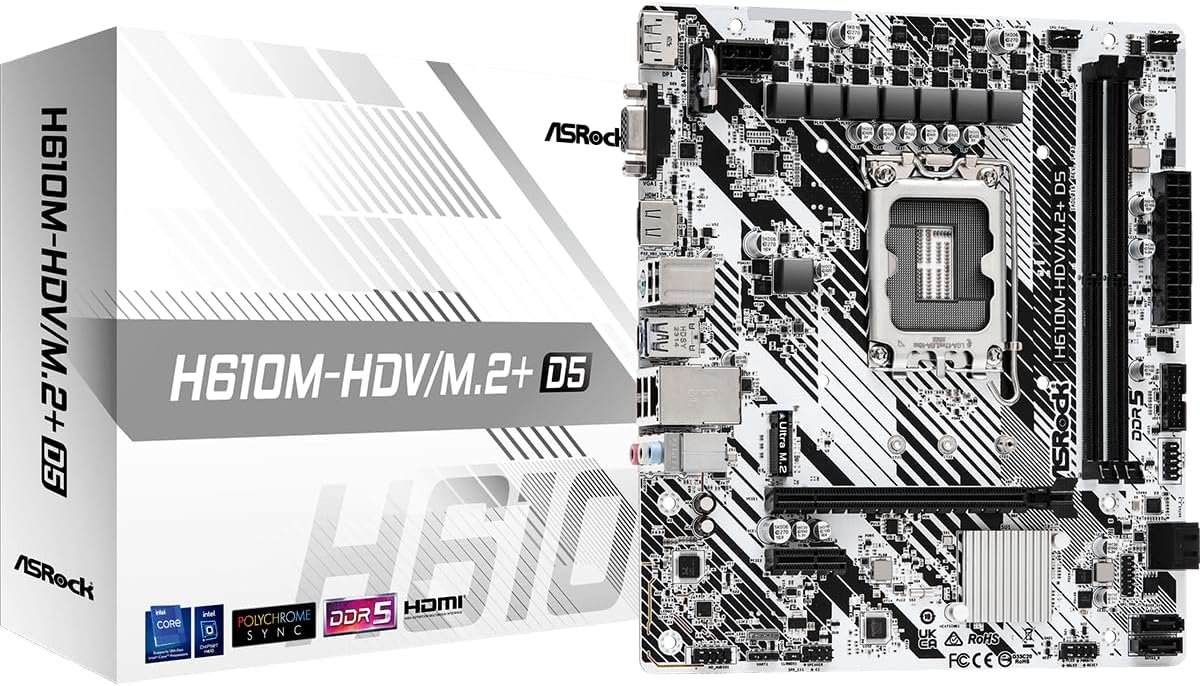
For Intel users, this board provides a cost-effective way to use 12th, 13th, and 14th Gen processors. It brings DDR5 support to entry-level builds for better performance.
We may earn a commission when you buy through this link, at no additional cost to you.
The 6+1+1 power phase ensures stability for supported CPUs without excessive heat generation. PCIe 4.0 support allows for modern GPU and SSD integration.
Output options include HDMI, DisplayPort, and D-Sub for flexibility. It avoids unnecessary features to keep costs down while maintaining utility.
This board is best for office or home PCs using Intel Core CPUs. It offers solid compatibility and future-proofing within a budget.
Supports 14th, 13th, and 12th Gen Intel Core Processors for longevity.
DDR5 5600MHz support provides faster memory speeds than DDR4.
We may earn a commission when you buy through this link, at no additional cost to you.
Choosing the right motherboard involves balancing features, compatibility, and price to ensure your system runs efficiently without overspending.
The socket type determines which processors your motherboard can support. Ensure you select a board that matches your current or future CPU, such as AM4 for Ryzen or LGA1700 for Intel Core.
Always verify the supported CPU list on the manufacturer's website before purchasing to guarantee compatibility.
Chipsets define connectivity and overclocking capabilities. Budget options like A520 or H610 offer essential features, while B550 or H670 provide more ports and PCIe 4.0 support.
Prioritize the chipset that aligns with your storage and GPU requirements to avoid bottlenecks.
Check the memory type and speed support to ensure it matches your RAM needs. Modern builds often require DDR5, but DDR4 remains a cost-effective option for older platforms.
Select a board with sufficient RAM capacity to handle your applications and future upgrades.
The number and type of PCIe slots determine how many GPUs or expansion cards you can install. Ensure your board has enough lanes for your specific GPU.
Look for M.2 slots that support your preferred storage speeds to avoid slower loading times.
Voltage Regulator Modules (VRMs) deliver power to the CPU. A weak VRM can limit performance or stability under load.
For budget boards, look for digital phases or adequate heatsinks to ensure stable operation.
Ensure the board fits your case. Micro-ATX and ATX are standard, but mini-ITX is used for compact builds.
Check your case specifications to confirm the board size compatibility.
Count the USB and video ports to ensure you have enough for your peripherals. Missing ports may require expensive hubs.
Prioritize USB 3.2 Gen 2 or Type-C ports if you need high-speed data transfer.
Most boards include Gigabit LAN, but 2.5G LAN is becoming more common. Onboard Wi-Fi may cost more but offers wireless flexibility.
Decide if you need wireless connectivity to avoid purchasing extra adapters.
Install your CPU, RAM, and M.2 drives before placing the motherboard in the case to make access easier. Ensure all components are fully seated in their sockets.
Update your BIOS immediately after building to ensure compatibility with your processor and stability. Use a USB drive and follow the manufacturer's flashing instructions.
Keep your system cool by ensuring airflow is not restricted by cables. Regular dust removal from heatsinks and fans extends hardware lifespan.
The most affordable modern options typically belong to the A520 or H610 chipsets. They offer essential features without extra overhead. Ensure they match your CPU generation for compatibility.
Yes, boards with weak VRMs can throttle high-end CPUs under heavy loads. However, budget boards often match entry-level CPUs well. Check reviews for power delivery stability.
Onboard Wi-Fi saves you from buying separate adapters and is convenient for wireless setups. If you use Ethernet, a wired board is sufficient and cheaper. Decide based on your cabling needs.
Yes, most AM4 and LGA1700 boards support multiple generations. Always check the BIOS update requirements for newer CPUs. Some boards may need manual updates to support latest models.
Many modern boards support Flash BIOS buttons that work without a CPU. Otherwise, you need a working processor installed to update via USB. Always follow the manufacturer guide.
DDR4 boards often support up to 4600MHz, while DDR5 can reach 8000MHz. Choose speeds supported by your specific CPU to ensure stability. Avoid buying faster RAM than the board supports.
This guide highlighted ten exceptional options ranging from legacy solutions to modern AM5 and Intel platforms. Whether you prioritize raw value or specific connectivity needs, there is a board to fit your plan.
Focus on socket compatibility and VRM quality when making your final decision. These factors have the biggest impact on long-term reliability and performance.
Prices change frequently, so verify current costs before purchasing. A great deal today may vary tomorrow, so act when you find a match for your requirements.