
Phezer P15 Handheld Inkjet Printer
4.1Editor score
Lightweight ergonomic design
No app or computer required
Versatile surface compatibility
This guide compares the best handheld inkjet printers for barcode date batch and custom marking on surfaces like plastic metal wood and cardboard to help you
Handheld inkjet printers offer a versatile solution for marking products directly in warehouses factories and retail environments. These devices allow users to print dates batch numbers and logos without needing complex conveyor systems or fixed stations.
We compared ten leading models based on battery life print quality ease of use and versatility. Our analysis looked at real-world performance across various surfaces to determine which printers deliver the best value and reliability for different business needs.
Each pick highlights specific strengths such as portability ink capacity and interface design. Keep in mind that prices and availability can change frequently so always check the latest details before making a final purchasing decision for your operations.
4.1Editor score

4.7Editor score
4.4Editor score
The following table provides a side-by-side comparison of all ten models featured in this guide to help you quickly identify key differences in specifications and capabilities.


This handheld inkjet printer stands out as a top choice for businesses needing reliable and efficient marking solutions. It offers an impressive battery life and a user friendly interface that simplifies the printing process for operators.
We may earn a commission when you buy through this link, at no additional cost to you.
The device features a 4.3 inch HD capacitive touchscreen that allows for easy template creation and file imports. Its fast drying ink ensures that prints are waterproof and fade resistant which is crucial for product identification on various materials.
While the price is higher than some budget options the durability and feature set justify the investment. Users may need some time to learn the interface but the efficiency gains in packaging and labeling tasks are significant.
It is ideal for warehouse managers and production lines that require consistent high quality markings. If you need a versatile and durable printer that can handle long shifts without interruption this model is a strong recommendation.
The ability to edit templates directly on the device streamlines the labeling process significantly.
The quick drying formula prevents smudging and ensures clear readable codes even on curved surfaces.
We may earn a commission when you buy through this link, at no additional cost to you.
This intelligent handheld inkjet printer is designed with portability in mind making it easy to carry around large facilities. The lightweight build helps reduce operator fatigue during extended periods of use.
We may earn a commission when you buy through this link, at no additional cost to you.
It comes with a standard wrist strap to prevent accidental drops which is a thoughtful addition for high paced environments. The battery life supports over 16 hours of continuous operation ensuring it lasts through full shifts.
The print quality is crisp thanks to the 300 nozzle system which works well on plastic and cardboard surfaces. However some users might find the screen interface less intuitive compared to other models on the market.
This model is a great fit for small businesses or teams that need a reliable printer without extra bulk. It balances performance and portability well for general labeling tasks in warehouses or retail settings.
The included wrist strap adds an extra layer of security for handling the device during movement.
Continuous operation for more than 16 hours reduces downtime and ensures productivity throughout the day.
We may earn a commission when you buy through this link, at no additional cost to you.
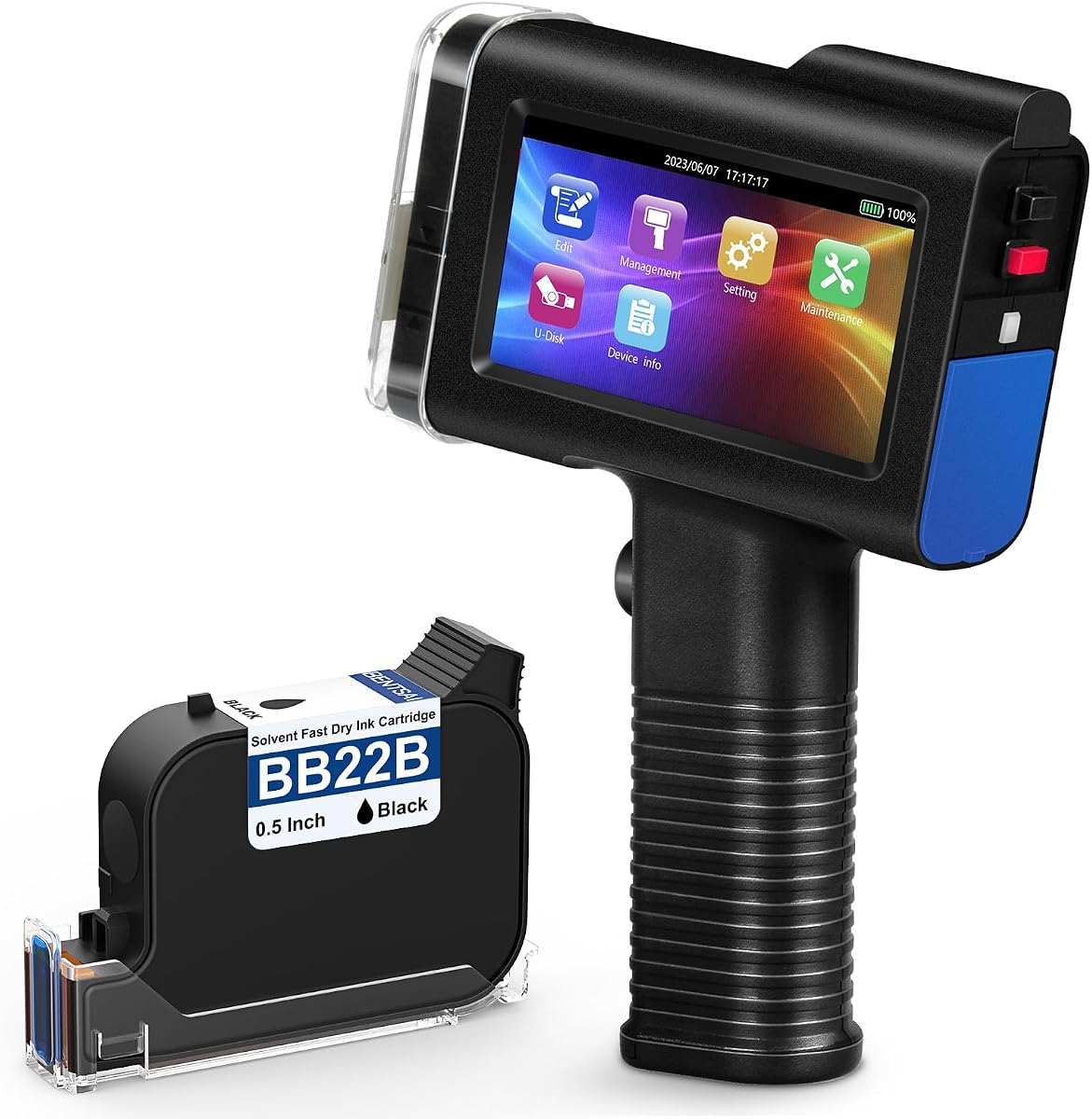
This BENTSAI handheld printer delivers high quality prints with a resolution that ensures sharp text and graphics. It is built to handle a wide range of surfaces including fabric metal and wood with consistent results.
We may earn a commission when you buy through this link, at no additional cost to you.
The ability to mount this unit to a conveyor line makes it valuable for automated labeling processes. Users can create custom templates on the touchscreen which saves time when printing recurring batch numbers or logos.
While it is priced higher than basic models the advanced features justify the cost for professional environments. The build quality is robust though it is slightly heavier than some ultralight competitors in this category.
Manufacturing and logistics teams will benefit most from its reliability and precision. If you need a printer that can handle complex designs and integrate into automated lines this model is a top contender.
The conveyor mounting option allows for seamless integration into existing production lines.
With 600 DPI resolution the printed codes remain scannable even after exposure to rough handling.
We may earn a commission when you buy through this link, at no additional cost to you.
This model from BENTSAI stands out for its ability to print up to one inch in height which is useful for large markings. The extended operation time ensures that workflows are not interrupted by frequent recharging.
We may earn a commission when you buy through this link, at no additional cost to you.
The upgraded five roller system provides stability and smooth movement across surfaces which improves print quality on uneven materials. Users can print up to ten lines of text on the same line of text needs.
While the device offers robust capabilities it may require more time to set up compared to simpler units. The weight is manageable but noticeable during prolonged handheld use over a full shift.
It is well suited for industrial applications where visibility and durability are key. If you need to mark large items or require high volume continuous printing this printer offers the necessary functionality.
The wide range of adjustable print heights allows users to adapt to different marking needs easily.
The five roller system ensures consistent contact with the surface for even ink distribution.
We may earn a commission when you buy through this link, at no additional cost to you.
The Phezer P15 offers a straightforward approach to handheld printing without needing a computer or app connection. Its lightweight design makes it easy to handle and move around a workspace without strain.
We may earn a commission when you buy through this link, at no additional cost to you.
With support for 25 languages this printer is suitable for diverse teams working in different regions. The battery capacity is sufficient for daily tasks and the screen allows for direct editing of content.
While it lacks some advanced features found in higher end models it performs well for standard labeling needs. The simplicity of use means less training time is required for new staff members to operate it.
Small businesses or home workshops will appreciate the ease of use and cost effectiveness. If you need a reliable and simple device for marking boxes or products this is a solid entry level choice.
The internal memory and independent system eliminate the need for external devices or network connections.
The design ensures comfortable grip and operation even during repetitive printing tasks.
We may earn a commission when you buy through this link, at no additional cost to you.
This MS-Z10 printer offers a range of print resolutions and heights to suit different marking requirements. It is designed to be portable and easy to use for various industries including retail and logistics.
We may earn a commission when you buy through this link, at no additional cost to you.
The ink dries quickly which helps to prevent smearing on porous surfaces like paper and cardboard. Users can import files via USB to customize prints which adds flexibility to the workflow.
One consideration is that the ink is not permanent which may limit its use for long term product identification. The average rating suggests some users may face occasional connectivity or usability challenges.
It is a good option for temporary markings or internal inventory management. If you need a versatile tool for short term labeling this printer offers a balance of features and affordability.
Multiple DPI settings allow users to choose between speed and detail depending on the task.
The USB port allows for easy import of external files to streamline the printing process.
We may earn a commission when you buy through this link, at no additional cost to you.
This portable printer supports a large one inch print height which is ideal for bold markings on products. The infrared aiming assist helps users position the device accurately for consistent results.
We may earn a commission when you buy through this link, at no additional cost to you.
The quick drying ink is waterproof which protects the print from smearing or fading in humid environments. Users have reported that the manual provides clear setup instructions to get started quickly.
While the interface is basic it is functional enough for most common printing tasks. The battery life supports long workdays making it reliable for continuous use in production or warehouse settings.
It is a solid choice for businesses needing large visible text without complex features. If you prioritize ease of setup and reliable ink performance this model meets those needs effectively.
The infrared assist ensures that the print is placed exactly where it is needed on the surface.
The waterproof ink ensures that labels remain legible even when exposed to moisture or spills.
We may earn a commission when you buy through this link, at no additional cost to you.
The XMINI printer is exceptionally light making it comfortable for operators to carry around all day. It features a durable screen and supports a variety of ink colors for different labeling applications.
We may earn a commission when you buy through this link, at no additional cost to you.
The processor ensures stable performance even when printing complex graphics or large batches of data. Users appreciate the independent system which allows for printing without connecting to external devices.
The touch pen helps avoid accidental touches on the screen ensuring accurate input during operation. However the screen size is smaller which may require some adjustment for users with larger hands.
This device is great for small teams or individuals needing a portable and reliable tool. If you value lightness and color options for your branding this printer is a strong candidate.
The availability of seven ink colors allows for customization and better brand visibility.
The touch pen tool ensures precise control over the interface preventing accidental changes.
We may earn a commission when you buy through this link, at no additional cost to you.
This mini handheld printer is designed for true portability with a detachable handle that converts to a compact mode. It fits easily in pockets or small bags making it convenient for outdoor or ladder work.
We may earn a commission when you buy through this link, at no additional cost to you.
The quick dry ink ensures waterproof adhesion in less than three seconds which is efficient for fast paced environments. It handles challenging surfaces like corrugated cardboard and plastic with good results.
While the capacity is lower than larger models it is sufficient for small batches or on demand printing. The high rating reflects user satisfaction with its ease of use and compact design.
It is an excellent choice for field workers or small retail shops. If you need a tiny powerful device for occasional marking this unit offers great convenience and reliability.
The detachable handle design allows the device to fit into small spaces for transport.
The engine is built to handle curved and corrugated surfaces without losing print quality.
We may earn a commission when you buy through this link, at no additional cost to you.
This printer offers excellent battery life and a lightweight build that makes it easy to handle for extended periods. The USB file printing feature allows for quick data uploads without extra software setup.
We may earn a commission when you buy through this link, at no additional cost to you.
It supports a range of print heights which makes it versatile for various marking needs. The ergonomic grip and wrist strap contribute to a comfortable user experience during repetitive tasks.
While the interface is simple it is effective for standard printing tasks. Users find it reliable for everyday use in logistics and warehousing settings without needing complex configurations.
It is a practical solution for teams needing consistent performance at a reasonable cost. If you prioritize battery life and ease of data transfer this model is a strong contender.
The battery supports over 16 hours of continuous use which covers most work shifts.
USB upload capability streamlines the process of updating batch numbers or custom graphics.
We may earn a commission when you buy through this link, at no additional cost to you.
Selecting the right handheld inkjet printer depends on several key factors that impact performance and usability in your specific environment.
The print height determines how large your text or codes will appear on the product. Higher resolution printers produce sharper images and more scannable barcodes which is critical for compliance.
Choose a model that offers adjustable height to adapt to different packaging sizes and ensure your codes remain legible.
Since these devices are portable battery life is essential for uninterrupted operations. Look for models that support at least 10 to 16 hours of continuous printing to avoid recharging during shifts.
A reliable battery ensures you can complete tasks without downtime which keeps your workflow efficient.
Ink quality varies by brand and type with some offering quick drying and waterproof formulas. Ensure the ink cartridge has a sufficient capacity to reduce the frequency of replacements and maintain productivity.
Selecting a printer with a reliable ink system prevents smearing and ensures your markings last longer.
Not all printers work equally well on every surface. Check that the device is rated for the materials you plan to use such as metal plastic wood or glass to avoid issues with adhesion.
Versatile models allow you to mark a wide range of products without needing multiple devices.
A user friendly touchscreen or interface simplifies the process of creating templates and changing settings. Models that allow direct file imports via USB or SD cards save time and reduce manual entry errors.
Look for intuitive controls that minimize the learning curve for your staff.
Handheld printers are designed to be moved around so weight is a major factor. Lighter devices reduce fatigue during long shifts and make it easier to carry the unit up ladders or across warehouses.
Consider the weight and whether it comes with a carrying case or strap for added convenience.
Technical issues can arise so having reliable customer support is valuable. Check for warranty terms and whether the manufacturer provides access to tutorials or live assistance.
Good support ensures you can resolve problems quickly and get back to work without major interruptions.
Prices vary significantly based on features and build quality. Determine your essential needs and compare models to find one that offers the best balance between cost and capability.
Investing in a reliable unit can save money in the long run by reducing errors and maintenance.
Before first use fully charge the battery and insert the ink cartridge securely into the designated slot. This ensures that the system initializes correctly and prevents leaks during initial operations.
To print simply turn on the device and select your desired template from the menu. Align the nozzle with the surface and trigger the print command while moving steadily to ensure even coverage.
After use always replace the protective cap on the ink cartridge to prevent the nozzles from drying out. Store the device in a cool dry place and clean the screen regularly to maintain optimal performance.
Most modern handheld inkjet printers operate independently and do not require a computer connection. You can edit text and templates directly on the device or import files via USB.
The lifespan of the ink depends on the volume of printing and the settings used. A standard cartridge can print thousands of characters but high volume use may require more frequent replacements.
Yes many models are designed to print on curved surfaces as long as the distance remains within the recommended range. Using positioning plates can help maintain consistent quality on uneven materials.
The prints are generally water and fade resistant but may not be permanent on all surfaces over long periods. They are suitable for product identification and shipping labels that do not face harsh chemical exposure.
Common compatible surfaces include cardboard plastic metal wood glass and fabric. Always test a small area first to ensure the ink adheres well and does not smear.
If the nozzle clogs follow the manufacturer instructions to run a cleaning cycle or use the provided cleaning tools. Avoid touching the nozzles directly to prevent damage to the print head.
Check the battery level and ensure the ink cartridge is properly inserted. Refer to the user manual for troubleshooting steps or contact customer support if the issue persists.
Yes most models support the printing of QR codes and barcodes. You can import pre generated codes or create them directly using the device interface.
This guide has highlighted ten top options ranging from budget friendly to premium models each with unique strengths for different needs. Whether you prioritize battery life print quality or ease of use there is a device here that can improve your marking efficiency.
When making your decision consider the specific surfaces and volume of work your team handles. A model that suits a high volume factory may differ from what is ideal for a small retail shop or warehouse.
Remember to check the current prices and availability before buying as these can fluctuate based on demand and promotions. Investing in the right tool will help streamline your operations and ensure your products are marked correctly.